
Multimodal developer API platform
How to use
OpenAI API Platform.
Building production text, vision, audio, realtime, image, video, retrieval, and tool-using applications through managed models and platform APIs.
Inside the product
See the working surface.
A current first-party interface reference, preserved locally with its source and capture date.
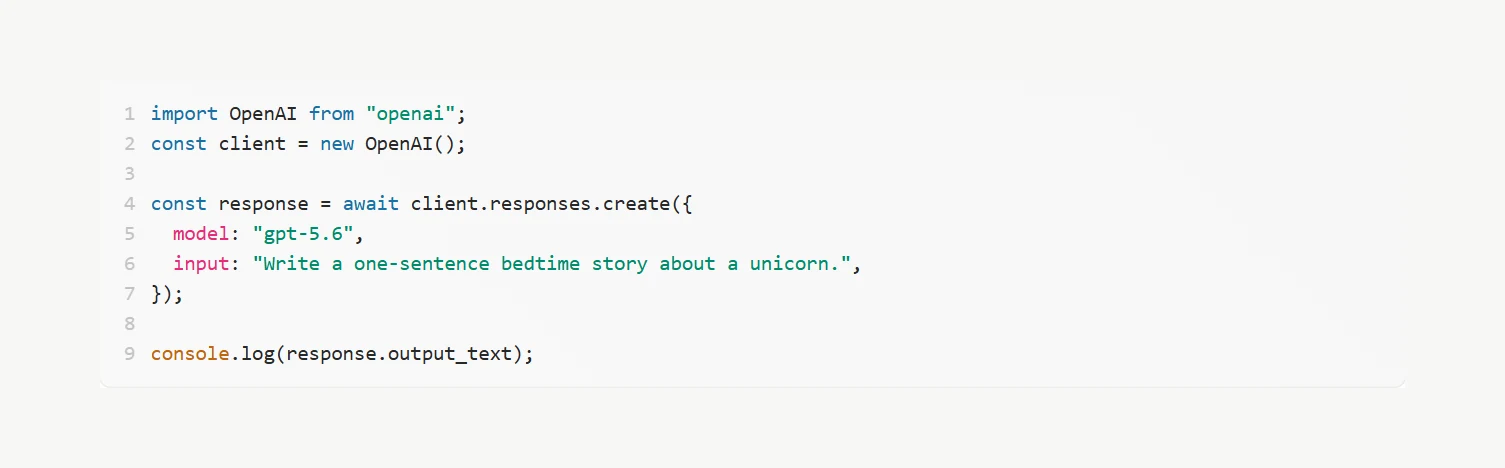
The official OpenAI quickstart reduces a first Responses API call to a client, a model, an input, and inspected output.
Interface reference · OpenAI API quickstart ↗ · Captured August 2, 2026OpenAI API Platform is a Developer platform for multimodal model APIs, the Responses API, tools, realtime applications, agents, files, fine-tuning, batch processing, evaluation, and governance. Building production text, vision, audio, realtime, image, video, retrieval, and tool-using applications through managed models and platform APIs. This guide covers the whole path in one place: official access, a first session that produces something reviewable, the checks that make output trustworthy, and the permissions worth limiting before you connect real work.
AI should make the work easier to inspect. If the workflow removes the source, the owner, or the review step, redesign the workflow.
Access & setup
Find, install, and sign in to OpenAI API Platform
Get into the official OpenAI API Platform experience with the right account and a setup you understand.
- 01
Start at https://platform.openai.com/ and confirm the domain before entering account or payment information.
- 02
Availability: The OpenAI API Platform is managed through a browser dashboard and accessed from server applications through REST APIs and official SDKs; it is distinct from the ChatGPT consumer application.
- 03
An OpenAI API organization and project, server-side project credentials, billing and rate limits, approved data controls, a versioned model and prompt strategy, representative evals, safety controls, observability, and incident ownership.
- 04
Sign in with the account you intend to keep using, then review plan, data, notification, and permission settings.
- 05
Run one low-risk test task before connecting sensitive files, repositories, or workspace data.
- Use official download pages.
- Review permissions during setup.
- Keep installers and applications updated.
First session
Your first useful OpenAI API Platform session
Learn the interaction loop using a small task with a clear outcome.
- 01
Define the user task, data classes, modalities, quality and safety metrics, latency, throughput, tools, retention, residency, cost, approvals, and rollback requirements.
- 02
Create a dedicated project and server-side key, review endpoint-specific data controls, choose a current model by measured task fit, and use the Responses API for new tool-using or multi-turn workflows.
- 03
Build a frozen eval set and run a bounded prototype with explicit model, instructions, output schema, storage choice, timeouts, retries, rate and token budgets, moderation, and request tracing.
- 04
Review evals, safety, tool authorization, privacy, failure behavior, latency, rate limits, and total task cost, then pin a snapshot where stability matters and canary with a tested fallback.
- State the outcome before the background.
- Provide the real source material.
- Review the result before expanding the task.
Quality control
Check the quality of OpenAI API Platform output
Turn generated code into a change you would put your name on in review.
- 01
Restate the intended behaviour and the acceptance criteria before reading a single generated line.
- 02
Read the diff rather than the chat summary; the summary describes intent, the diff describes what actually changed.
- 03
Run the test suite, then write a test that would fail if the change were wrong, and confirm it passes for the right reason.
- 04
Check the edges the model tends to skip: error paths, null and empty cases, concurrency, and migration or rollback behaviour.
- 05
Trace every new dependency, network call, and file write, and confirm each one is genuinely required.
- Review the diff, never the description of the diff.
- A passing test suite proves the tests pass, not that the change is correct.
- Keep changes small enough that a human can actually review them.
Privacy & permissions
Use OpenAI API Platform safely
Give the tool enough repository access to help, and no more than that.
- 01
Decide what the tool may read and what it may write before connecting a repository.
- 02
Scope tokens and integrations to the narrowest repository, branch, and permission set that still works.
- 03
Keep secrets out of the context window: use environment variables and secret stores, never inline credentials.
- 04
Require review before generated code touches authentication, payments, permissions, migrations, or deletion paths.
- 05
Audit what the integration retained after the session, and revoke access that is no longer needed.
- API data is not used for training by default unless the customer opts in, but abuse-monitoring logs and feature-specific application state may still be retained; endpoint eligibility differs for Zero Data Retention, residency, background mode, files, audio, video, search, and other tools. Keep keys server-side, separate projects, minimize and classify data, set store deliberately, pin and evaluate models, authorize tools outside the model, moderate inputs and outputs, log request IDs without content, and require approval for consequential actions.
- Follow your organisation's approved-use policy.
- Never treat fluent output as authorization to act.
Core workflows
Step-by-step ways to use OpenAI API Platform for the work it does best.
Each workflow is a separate guide with its own steps and review checkpoints.
Use a versioned task dataset, explicit storage and data controls, production limits, and a canary instead of selecting a model from anecdotal prompts.
↗ 02 WorkflowBuild a safe OpenAI tool-using applicationTreat model-selected tools and arguments as proposals while identity, authorization, validation, execution, and approval remain in application code.
↗Official references
Check the current product documentation.
Features, plan limits, availability, and data controls change. These official pages are the starting points used for this guide.