How to use Base44
Describe an app and Base44 builds it, then runs the hosting, database and logins for you. That convenience is also the catch: Base44 says its exported code still relies on Base44 to run, so moving away means rebuilding the backend.
The short version
- Start at
app.base44.comwith a short prompt. Free gives you 25 message credits a month, at most 5 a day. - Expect about 0.5 credits for a text tweak and 3 to 4 for an app-wide change. Previewing and manual visual edits are free.
- Budget two kinds of credit: message credits for building, and integration credits for what your live app does, such as sending email.
- Need your code? ZIP export and GitHub sync start at Builder, $50 a month. Your data exports as CSV, one table at a time.
- Your promptUses message credits
- Your app's codeReact frontend you can export
- Base44 backendData, logins, functions, integrations
- Your usersTheir actions use integration credits
At a glance
- What it is
- AI app builder with hosting included
- Owner
- Wix, since June 2025
- Paid plans
- $20 to $200 a month, or 20% less yearly
- Hosted for you
- App, database, logins, files, email
- Code export
- Builder plan and above
- Self-hosting
- Not supported
Official links
Is Base44 right for me?
Good fit if
- You want a working internal tool or client portal without touching a server
- You're testing a business idea and speed matters more than where the code lives
- You want payments, login and a database included from the first prompt
- You're happy to stay on one platform as long as the app lives
Look elsewhere if
- You must be able to move the whole app to your own servers later
- You need your data kept out of AI training and aren't buying Enterprise
- You want a fixed price per change: credit use is only known after each message runs
- You need to pay by PayPal, bank transfer, virtual card or crypto, which Base44 doesn't accept
How do I build my first app?
Five steps, in Base44's own order: describe it, watch it build, customize, test, publish.
- Describe your idea at
app.base44.com. You'll be asked to sign up. You can also start from plan mode, a URL you own, or a Figma frame. - Watch it build. The chat is on the left and a working preview on the right.
- Customize with more prompts, or use Edit mode to change things by hand.
- Test it in the preview as a real user would. Base44 says previewing and clicking through are always free.
- Publish from the top bar. Every app also has a free
myapp.base44.appaddress from the moment you create it.
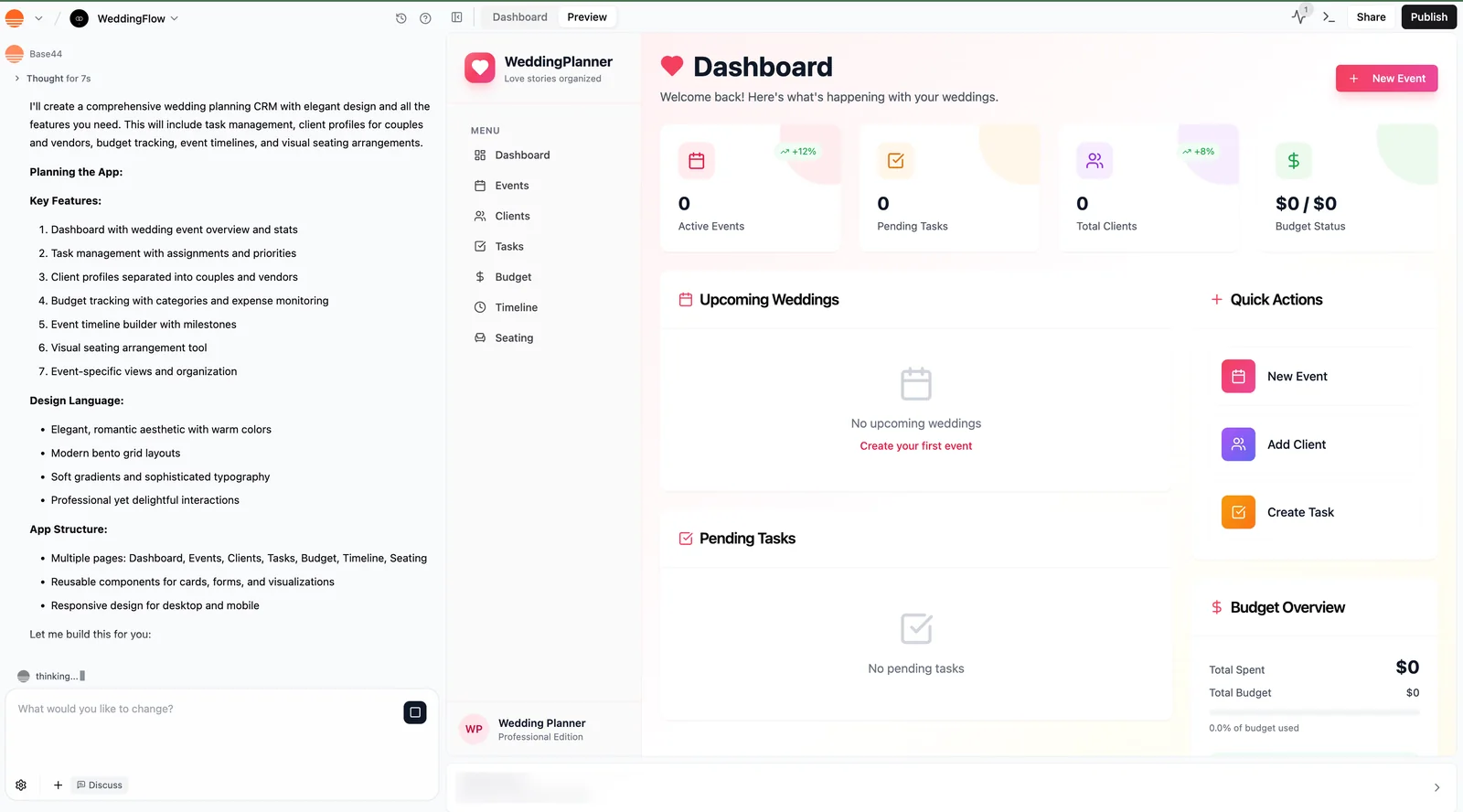
Plan before you spend. In Discuss mode, the AI answers without changing your app, and each message uses about 0.3 message credits. Press Ctrl + . or Cmd + . to switch. On a Free plan's 5 credits a day, this is where the thinking should happen.
How do Base44 credits work?
There are two kinds. Message credits pay for building, and integration credits pay for running. Neither has a set price per action, and Base44 calculates the cost after each one runs.
| Scope of change | Example | Typical credits |
|---|---|---|
| Simple visual or text change | One element or a short piece of text | About 0.5 |
| Improving a small feature | Logic across a few files | About 1 |
| Adding a complex module | New tables, flows and logic | About 2 |
| Large or app-wide change | "Translate the whole app" | About 3 to 4 |
| A Discuss mode message | Asking or planning | About 0.3 |
| What your app does | Typical credits |
|---|---|
| Send an email | About 1, or 2 from your own domain |
| Generate an image | About 1 |
| Generate a video | About 5 per second |
| Generate speech | About 1 per 50 characters |
| LLM call on Automatic | About 1, or from about 3 on a chosen model |
| Message to an in-app agent | From about 3 on Automatic |
| 10 workflow steps | About 1, plus whatever each step does |
| 100 backend function runs | About 1, plus whatever the function does |
| Reading and writing your database | Free |
| Calling an outside service with your own API key | Free |
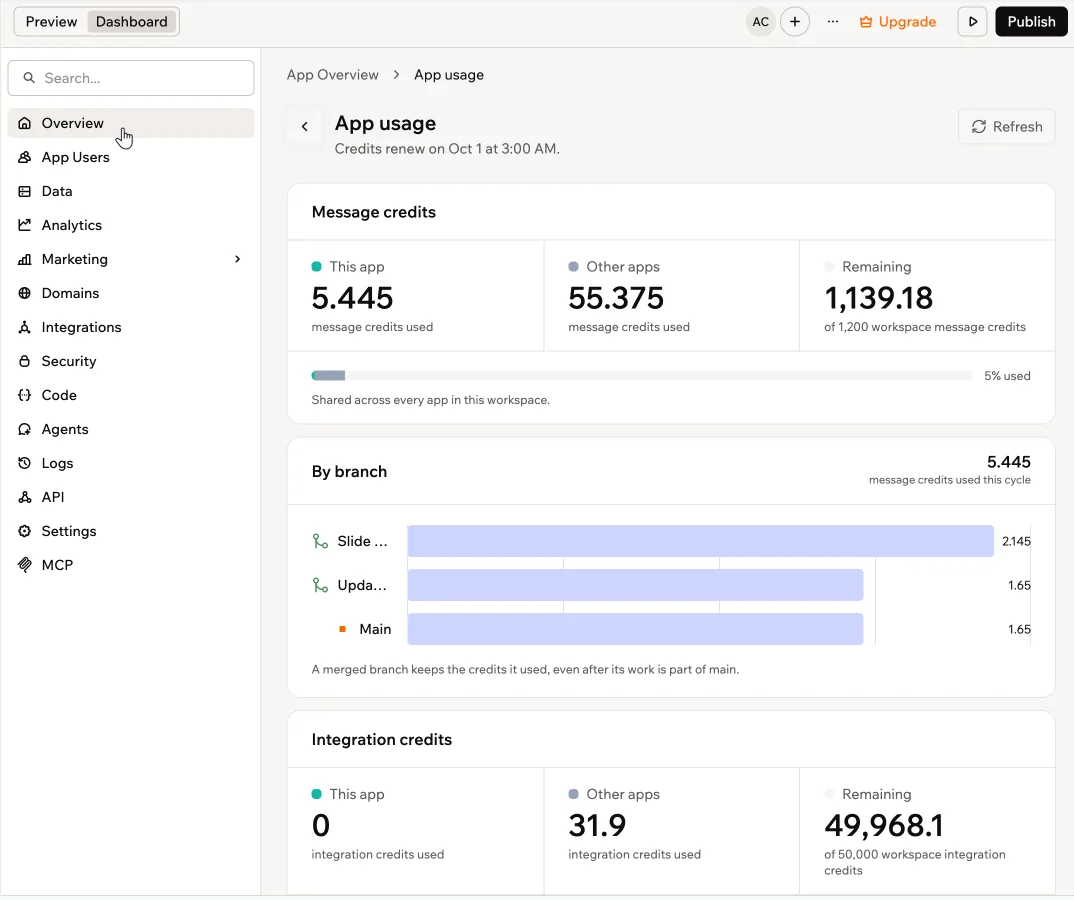
What happens when integration credits run out. You get an email, and your live app's email, AI and similar actions fail. Your users see a generic error that doesn't mention credits, so it can look like your app is broken.
How to spend less
- Keep the model on Automatic
- Use Edit mode to select an element first, so the AI doesn't scan your whole layout
- Click Revert rather than prompting your way out of a bad change
- Try auto-fix once or twice, then move to Discuss
- Add features in small steps and test each one
What you can't get back
- Unused credits expire when they reset, on paid and Free plans
- Credits aren't refunded for AI mistakes
- Work done before you press stop is still charged
- A merged branch keeps the credits it used
- Free plan auto-fixes use credits. On paid plans they're free.
 Watch: Base44 | CreditsOfficial video from Base44.
Which Base44 plan do I need?
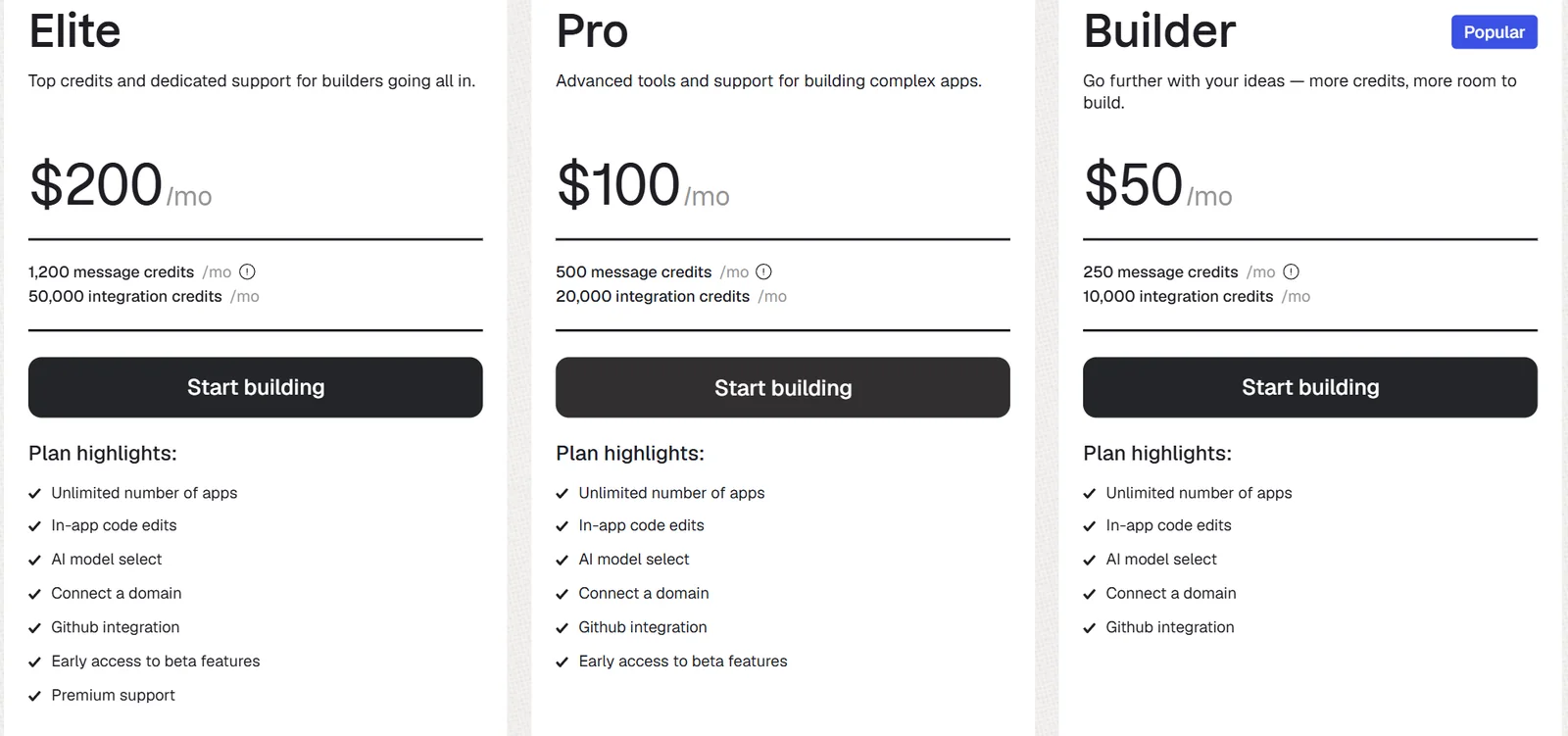
Features set the floor. Starter lets you edit code and use your own domain, but backend functions, GitHub sync and ZIP export begin at Builder.
| Free | Starter | Builder | Pro | Elite | |
|---|---|---|---|---|---|
| Monthly price | $0 | $20 | $50 | $100 | $200 |
| Message credits a month | 25 | 100 | 250 | 500 | 1,200 |
| Integration credits a month | 100 | 2,000 | 10,000 | 20,000 | 50,000 |
| Apps | 5 | Unlimited | Unlimited | Unlimited | Unlimited |
| Private apps, custom domain, edit code | No | Yes | Yes | Yes | Yes |
| Backend functions, ZIP and GitHub | No | No | Yes | Yes | Yes |
| Database per app | 200 MB | 2 GB | 5 GB | 10 GB | 25 GB |
| Automatic data backups | No | No | No | No | 7 days |
Rule of thumb, not a Base44 figure: a real app with an external API, payments through your own Stripe logic, or any chance of leaving needs Builder. That's the plan to compare against rivals, rather than Starter.
Workspaces hold the plan. Each workspace has its own plan and shared credit pool, and only the owner can buy, change or cancel it. If backend functions are blocked on a paid plan, check which workspace owns the app.
Plans are non-refundable. If you bought the wrong plan by mistake, Base44 says to contact Customer Care quickly, and approved exceptions are prorated minus fees. A bank dispute suspends your workspace and turns off your custom domains while it's open, so ask support first.
What does Base44 host for me?
Almost everything. That's the main reason to use it, and the reason it's hard to leave.
| Part | What Base44 provides | Limit or catch |
|---|---|---|
| Hosting | A live myapp.base44.app address | Custom domain needs Starter |
| Database | Tables you browse under Dashboard > Data | Size and record limits by plan |
| Logins | Authentication and user management | Runs only on Base44's backend |
| Backend functions | Server code, redeployed from Code | Builder and above |
| Files | Uploads, with no overall storage cap | A limit on each file's size, by type |
| Sent from a Base44 service | Uses integration credits | |
| Payments | Base44 Payments powered by Wix, or Stripe | Wix option limited to listed countries |
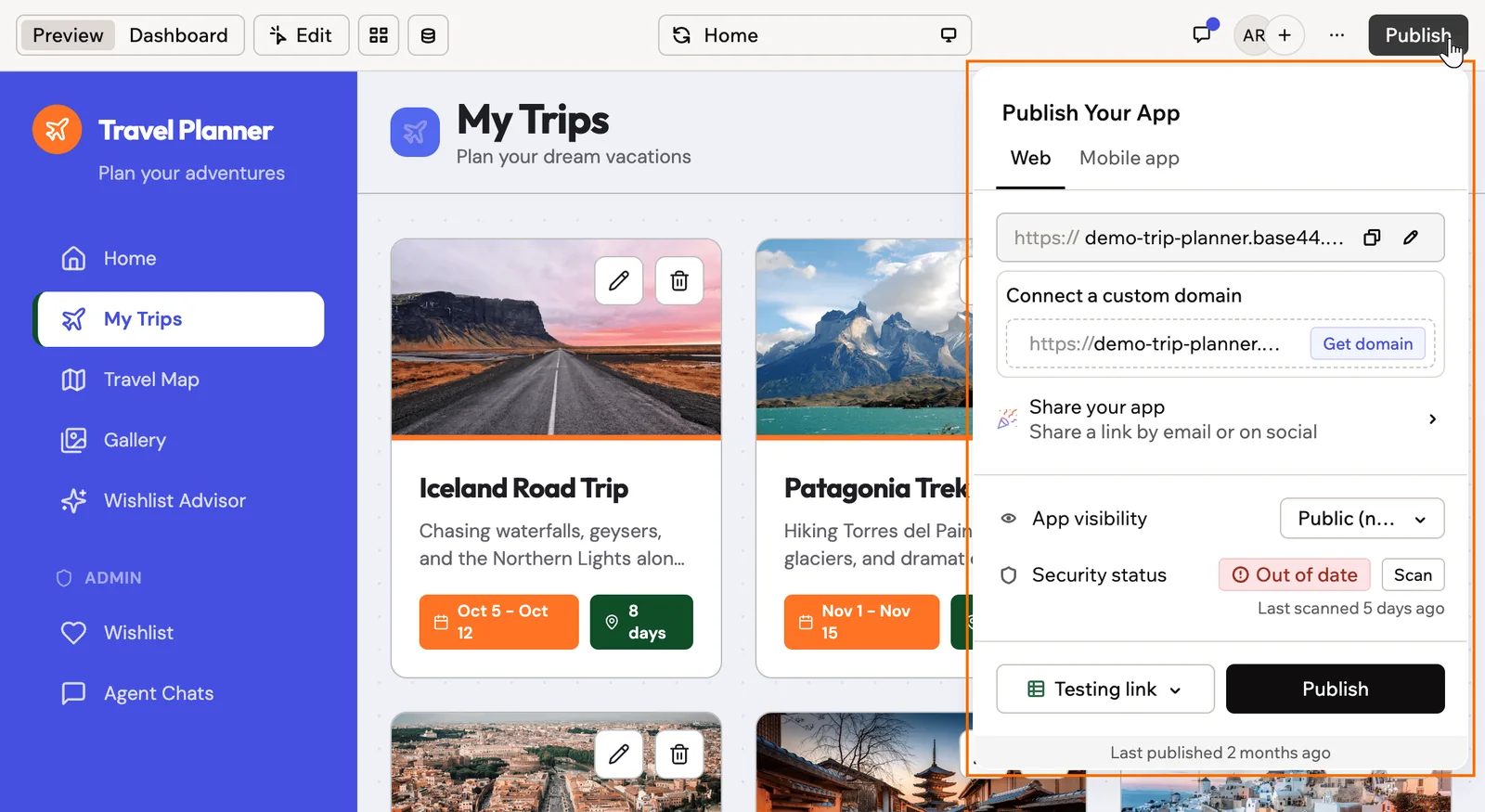
You're still responsible for security. Base44 cites SOC 2 Type II and ISO 27001 for the platform, but says your app's settings are your job. Before publishing, set each table's permissions and run the scan. For personal records, use Creator Only on Read, Update and Delete. All Users means anyone, even without signing in.
If you stop paying. Your workspace drops to Free at the end of the billing period. You choose 5 apps to stay published and the others are unpublished. Custom domains stop working, and Base44 warns that apps can lose payments or go offline. It shows the full list before you confirm.
Deleted data. Deleted records are kept for 30 days and can be restored from Recently deleted. Automatic backups are Elite and above only, so on lower plans your own CSV exports are your backup.
Can I take my code and data out?
You can take a copy of both. You can't take the running app, because Base44 doesn't support self-hosting.
The sentence to read before you build. Base44's developer docs say a ZIP "is a copy of your code, not a way to move your app off Base44." To run fully elsewhere, you'd replace the database, logins and integrations with your own backend and change the code that uses them.
| Method | Plan | You get | You don't get |
|---|---|---|---|
| Export project as ZIP | Builder | Your app's current saved code | Independence. It still calls Base44. |
| GitHub 2-way sync | Builder | Code in your repository, syncing automatically | A manual push option, or older versions |
base44 eject | Any account with the CLI | Frontend, schemas and backend resources in a new project | Your data, and it's still a new backend on Base44 |
| CSV export | All | Each table's records, in a spreadsheet file | One-click export of the whole database |
export-to-zip API | Personal access token | Source ZIP for a branch | Stability: it's in beta |
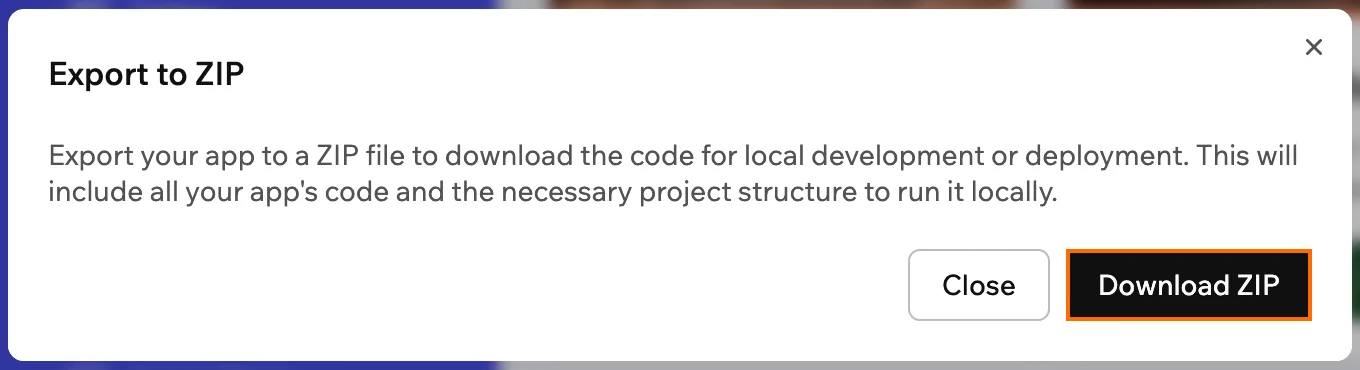
- Back up code: in the editor on a computer, click the More actions icon, then Export project as ZIP and Download ZIP. It isn't available from a phone.
- Back up data: go to Dashboard > Data, select a table, click More actions, then Export. Repeat for each table. If a filter is on, it exports only the matching records.
- Keep the schema with it: a CSV has records, while your table definitions come with the code tools, such as
base44 eject. - Check your login plan: Base44 doesn't describe exporting user accounts in these steps, so plan how users will sign in again if you ever move. Ask support to confirm before relying on it.
Connect GitHub early. Once connected, Version History can't return to versions from before the connection, because those aren't in the repository. Also, connecting creates a new repository. To work on code already on GitHub, Base44 points you to Base Code.
Clone an app into a local project
npm install -g base44@latest   # needs Node.js 20.19.0 or higher
base44 eject                   # pick an app and a folder

# In a script or CI
base44 eject --app-id <APP_ID> --path ./my-ejected-app --yes
base44 build                   # injects the new app ID
Eject makes a copy, not a move. Your original app stays as it was, the new project has its own app ID and an empty database, and the two are independent from then on.
What does Wix ownership mean for Base44?
Wix bought Base44 in 2025, and Base44's terms now name Wix.com Ltd. as the company you're contracting with. Who owns your work is a separate question.
What's on the record
- Wix announced the purchase on 18 June 2025, for about $80 million plus earn-out payments through 2029
- Wix said Base44 would continue as a distinct product and business
- The terms name Wix.com Ltd. as the operator of Base44-branded services
- Base44 Payments runs on Wix Payments, under Wix's terms
- Domains bought through Base44 sit on a Wix account tied to the workspace
What's in the terms about your work
- You own the generated code and apps, subject to Wix's own intellectual property
- Wix takes a license to use your data and output, which includes training its AI tools
- After your subscription ends, Wix doesn't guarantee continued access to your data
- It may delete your data and generated output after termination
- Anything you export before that is at your own risk
AI training. The Terms of Service, last updated 22 June 2026, list training "Company software tools" among the permitted uses of customer data, in a license they call irrevocable and perpetual. The plan docs list Excluded from AI model training as an Enterprise highlight. No opt-out was found in the terms or privacy policy for other plans, so ask Base44 if this matters to you. This is a summary, not legal advice.
Moving a domain. When an app moves to a new workspace, a domain bought through Base44 stays on the original workspace's Wix account. Sort out domain ownership before you hand an app to a client.
Hidden tips
Details that are easy to miss, each with the official page that backs it up.
-
Stopping the AI still costs
Replies the AI finished before you stopped it are charged, while a reply cut off partway isn't. Stop before the first reply and it's free.
Credits -
Your free credit day has a clock
Free credits reset at midnight in the workspace owner's timezone. Paid credits reset at your exact purchase time in UTC, so they can appear a day early or late locally.
Credits -
Upgrades can carry credits over
Going from a monthly plan to a higher monthly plan carries unused credits for one more cycle. Upgrades involving a yearly plan don't.
Credits -
Spot runaway spend
Credit usage has an Unusual spend card comparing the last 7 days with the 7 before, once you have 14 days of history. Check it after adding workflows.
Credits -
Earn 20 credits once
Share your project on LinkedIn or X from an account with over 100 followers, tag @base44 and write at least 200 characters. The panel is still rolling out.
Credits -
Yearly can't go back to monthly
You can't switch from yearly to monthly, or pause a plan. A yearly plan does include a free domain for 1 year, if you claim it within 60 days.
Billing and plans -
Imports only add rows
CSV imports never update or overwrite records. To replace a table, clear it first, and export it beforehand as a backup.
Managing your app data -
Mobile buyers are locked in
A plan bought through the App Store or Google Play can't run alongside a web plan. To move, you must cancel and wait for it to end. Website discounts don't apply there.
Billing and plans -
Student discount
Students, teachers and staff at accredited institutions can get 50% off Starter or Builder once per account, after verifying a school email.
Billing and plans
Base44 FAQ
Is Base44 free?
There's a Free plan with 25 message credits a month, up to 5 a day, 100 integration credits and up to 5 apps. Private apps, custom domains and code edits need a paid plan.
How many credits does it take to build an app?
Base44 doesn't publish a figure per app, because cost is worked out after each message. Its rough ranges are about 0.5 credits for a small tweak and 3 to 4 for an app-wide change. Check Credits Used on each message to see your real cost.
Can I export my Base44 app and host it myself?
You can export the code on the Builder plan or above, but Base44 doesn't support self-hosting. Exported code still uses Base44 for data, logins, backend functions and integrations. To leave entirely, you'd replace those parts with your own backend and change the code that uses them.
Is Base44 owned by Wix?
Yes. Wix announced the acquisition on 18 June 2025, and Base44's terms name Wix.com Ltd. as the operator of Base44-branded services. Wix said Base44 would continue as a distinct product and business.
Who owns the code Base44 generates?
Base44's terms say the customer owns the code and applications generated by the platform, subject to the company's own intellectual property. The same terms give the company a license over your data and output, so read them if that matters to you.
Does Base44 use my data to train AI?
The terms list training company AI and machine learning tools among the permitted uses of customer data and output. Exclusion from AI model training appears as a highlight of the Enterprise plan. Ask Base44 directly if you need a firm answer for your plan.
What happens to my app if I cancel?
Your plan runs to the end of the billing period, then the workspace moves to Free. You choose up to 5 apps to keep published, and the others are unpublished. Custom domains stop working, and Base44 shows what else you'd lose before you confirm.
Sources
Facts checked 6 November 2026. Products change, so confirm anything important on the official pages.
- Quick start
- Billing and plans
- Credits
- Pricing page
- Developer tools and exporting code
- GitHub integration
- eject command
- Start from an existing app
- Export app source code API
- Managing your app data
- Backup and restore
- Security overview
- Data permissions
- Custom domains
- Base44 Payments powered by Wix
- AI chat modes
- Terms of Service
- Privacy policy
- Wix press release on the acquisition