How to use Google Antigravity
Google Antigravity is an agent platform for writing software, available as a desktop app, a terminal tool, editor extensions and a Python SDK. It's free to start. What matters most is how much you let the agent do and how your quota is measured.
The short version
- Install the desktop app or run the
agyCLI installer, then sign in with a personal Google Account. You must be 18 or older, in a supported region. - Keep the Default permission preset. Turbo turns off the sandbox and gives the agent your whole filesystem.
- Use
/planon bigger tasks, so you can review the plan before files change. - Don't use your Antigravity login in other tools. The terms can suspend your account for it, even for coding agents you trust.
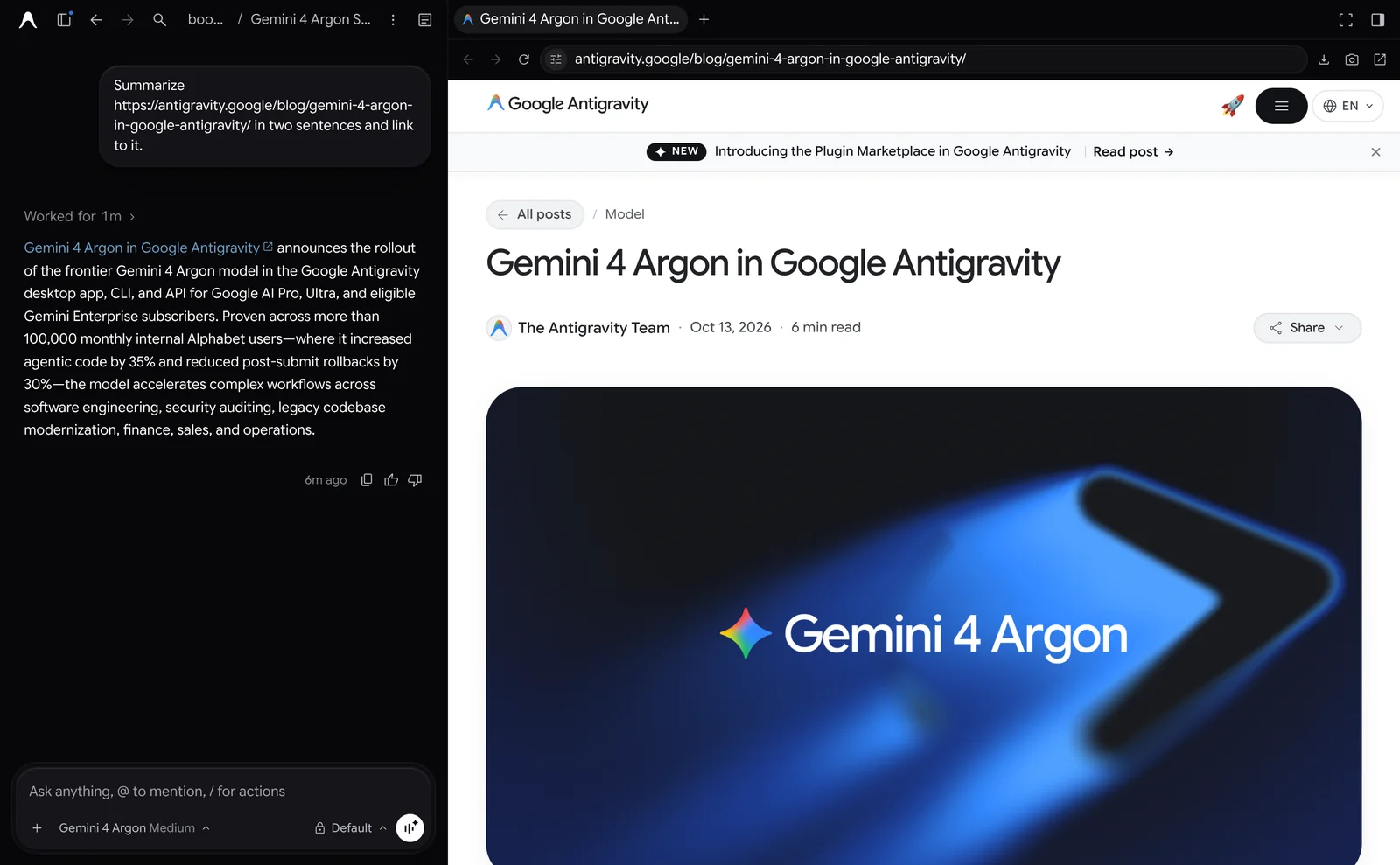
At a glance
- What it is
- Agent platform: app, CLI, IDE, SDK
- Runs on
- macOS, Windows, Linux, Googlebook
- Free plan
- $0, with weekly quota
- Paid quota
- Via Google AI Pro or Ultra
- Business
- Gemini Enterprise, from $30 per seat
- Bring your own key
- Not supported
Official links
Is Google Antigravity right for me?
Good fit if
- You want agents that plan, run commands, use a browser and show you the results for review
- You want the same agent in a terminal, a desktop app or your existing editor
- You already pay for Google AI Pro or Ultra and want to use that quota
- You're moving from Gemini CLI or Firebase Studio, which both have migration guides
Look elsewhere if
- You want to use your own API key for more capacity, which isn't supported
- You want to plug your login into Claude Code, OpenClaw or OpenCode, which breaks the terms
- You need predictable prompt counts: limits follow the work done, and can change
- You're under 18, or outside the supported regions
App, CLI, extension or IDE: which should I install?
Google offers several ways in, and they share the same agents. Pick the one that matches where you already work.
| Surface | Good for | Requirements or notes |
|---|---|---|
| App | Managing several agents, projects and scheduled tasks | macOS 12+, Windows 10 or 11 (64-bit), or Linux with glibc 2.28+ |
CLI (agy) | Terminal work, scripts and CI | Installs to ~/.local/bin/agy on macOS and Linux |
| Editor extensions | Keeping your current editor | VS Code 1.90+, IntelliJ 2026.2.1+, Visual Studio, Zed, Xcode 27 beta 6+, Eclipse (preview) |
| Antigravity IDE | A full agent-first editor | No enterprise sign-in |
| SDK | Building custom agents in Python | Programmatic use |
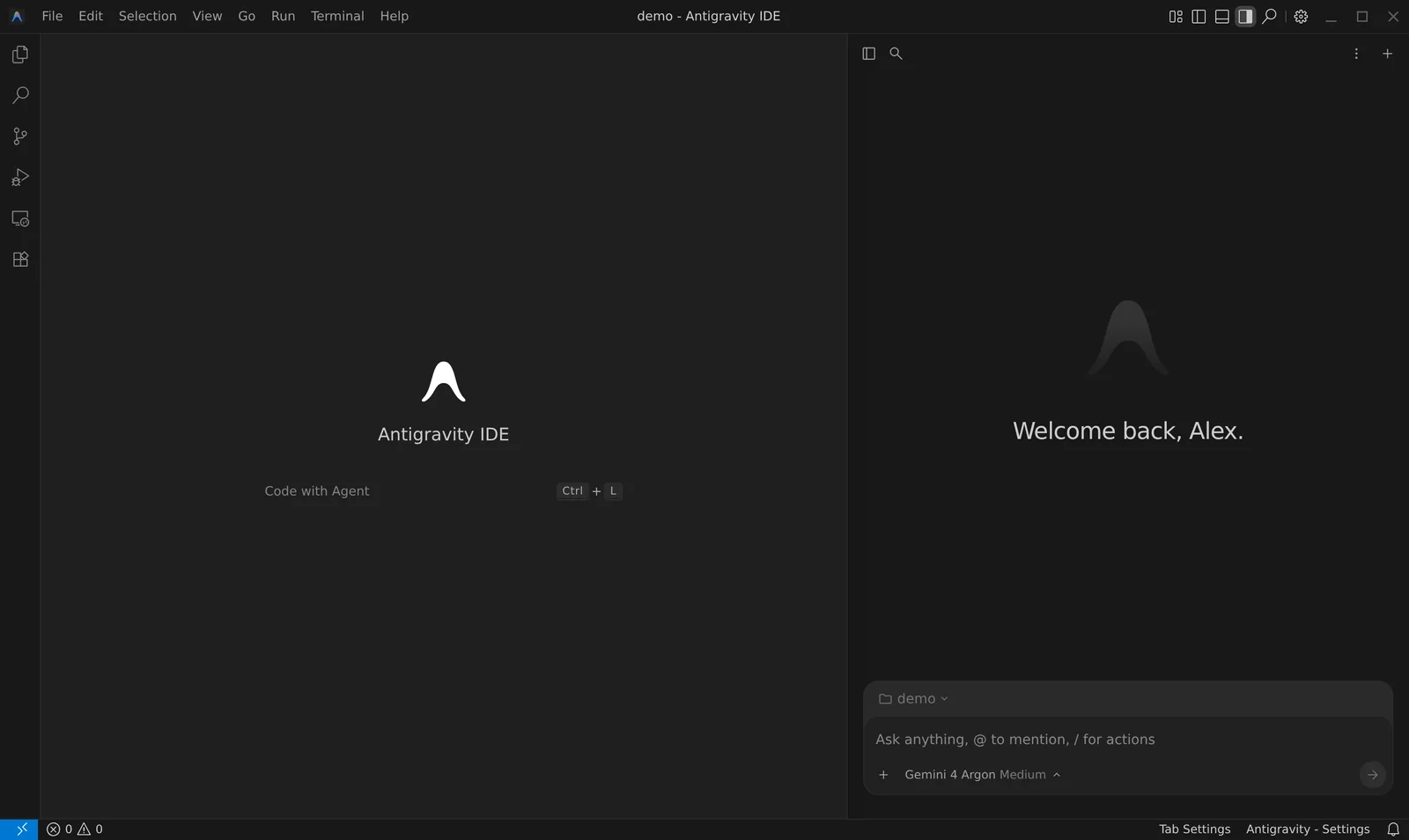
Ctrl+L to start coding with the agent. Image: Antigravity docs, retrieved November 2026. The current app may look different.Install the CLI
# macOS, Linux or Googlebook
curl -fsSL https://antigravity.google/cli/install.sh | bash

# Windows PowerShell
irm https://antigravity.google/cli/install.ps1 | iex

agy --version
On first launch, the CLI asks for a color scheme and rendering mode, and for confirmation that you trust the repository before the agent indexes files. If you get agy: command not found, the install folder isn't on your PATH.
 Watch: Learn the basics of Google AntigravityOfficial video from Google Antigravity.
How do I run my first task?
Open a project, then ask for a small change. For anything bigger, start with /plan, which explores your code and asks questions before changing files.
/planReads the code and asks questions- Implementation PlanYou review and comment
- Agent worksRuns inside the sandbox
- Review paneCheck the diff, then commit
/plan and review docs.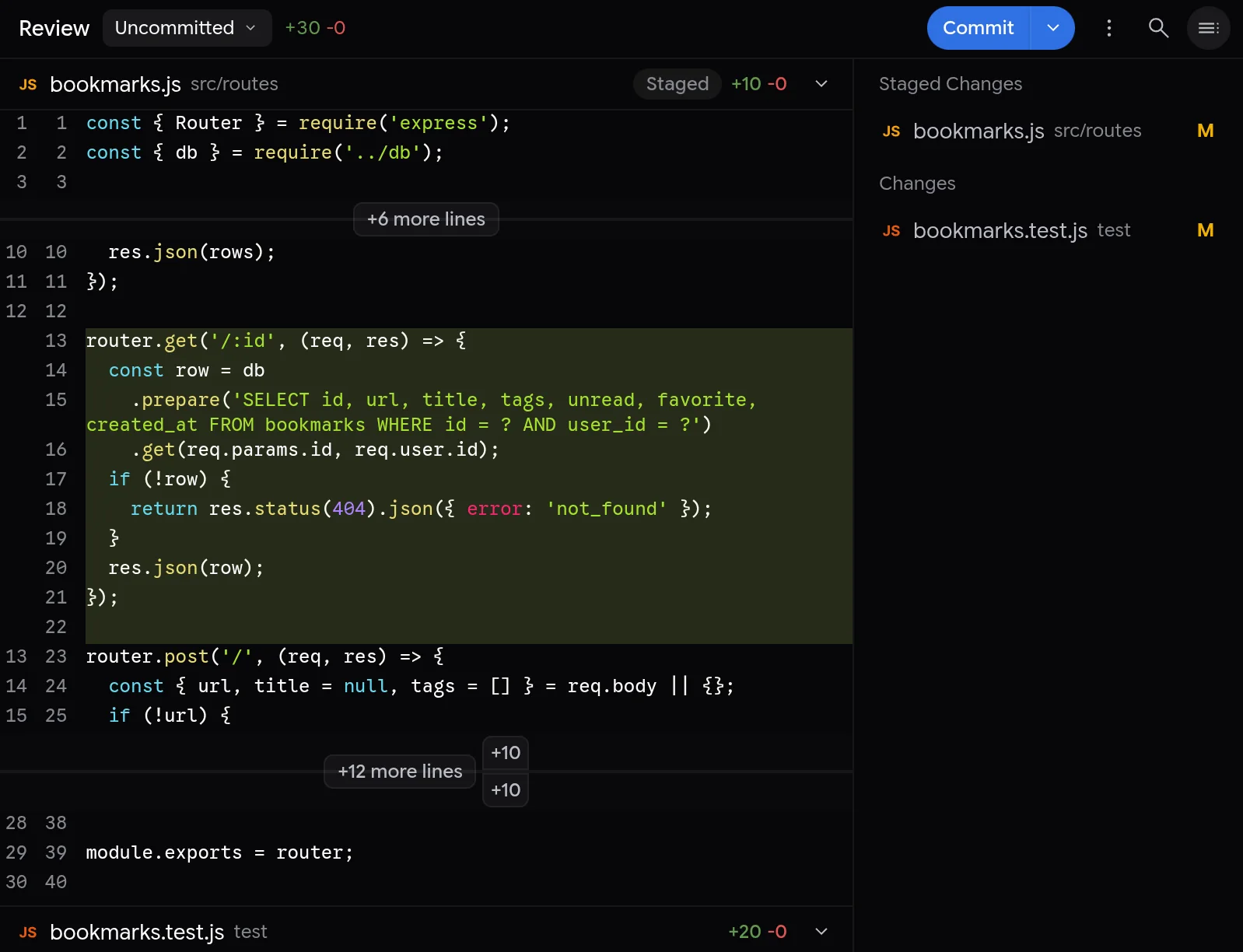
| Command | What it does | Availability |
|---|---|---|
/plan | Plans without changing files | App, CLI |
/boost | A multi-agent pipeline for hard bugs and refactors | App, CLI, paid plans |
/teamwork | A multi-agent team for large projects and research | App, CLI |
/schedule | Sets up scheduled tasks | App, CLI, IDE |
/usage or /quota | Shows model quota | CLI |
agy -p "..." | Runs one prompt and exits, for scripts and CI | CLI |
Plan reviews have their own setting. Under Agent Behavior, Plan Review Policy decides whether the agent asks you to review its documents. Always Ask is shown in the docs' screenshot, and Always Proceed skips the pause.
What should I let the agent do?
Stay on Default. Commands run without prompts inside a sandbox with no network, and anything needing to go outside asks you first.
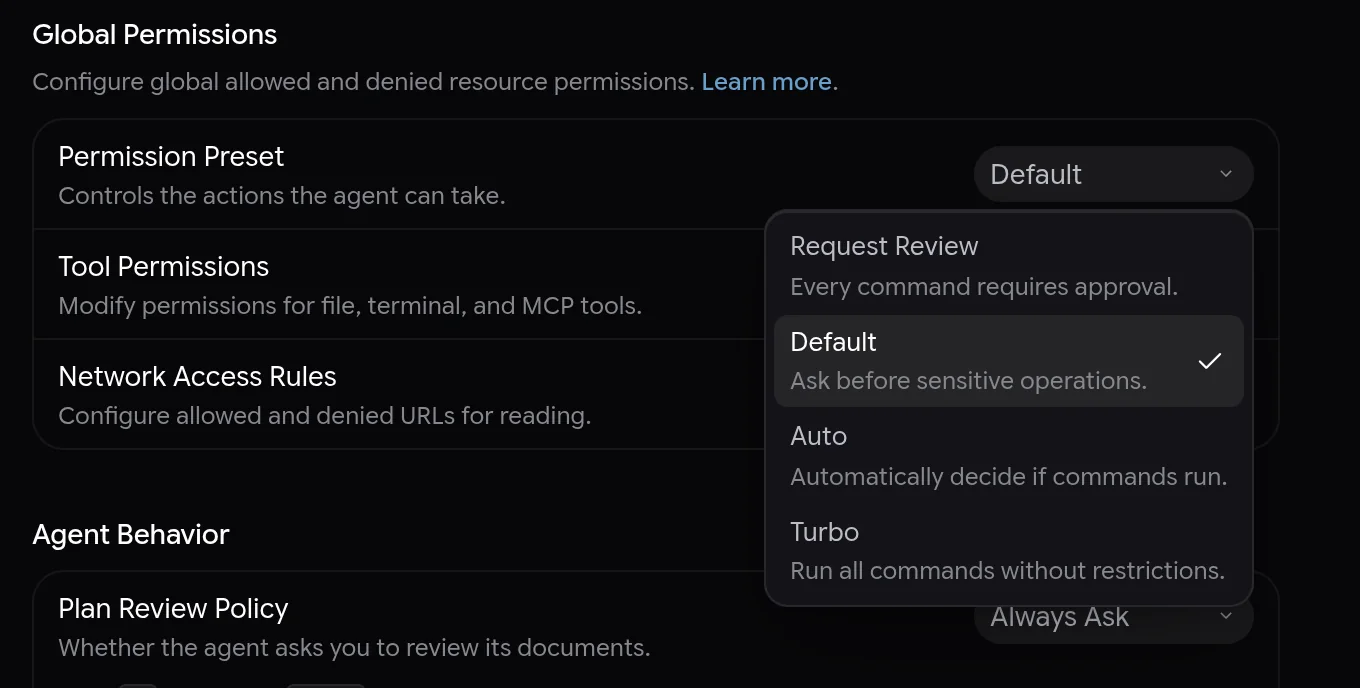
| Preset | Sandbox | Commands | Files | MCP and web |
|---|---|---|---|---|
| Request Review | Off | Always ask | Workspace only | Ask |
| Default | On | Allowed in sandbox, ask outside | Workspace and temp | Ask |
| Auto | On | Allowed in sandbox, checked automatically outside | Workspace and temp | Ask |
| Turbo | Off | Unrestricted | Full filesystem | Allowed |
The picker in the message box changes more than this chat. It changes your global preset, or the project's preset if the project overrides it. If you switch to Turbo for one task, remember to switch back.
Why isn't my sandbox on? Antigravity falls back to Request Review if the sandbox isn't available. On Windows it needs Windows 11 24H2 or later with the August 2026 update or later. Linux uses namespaces and macOS uses sandbox-exec, so there's no Docker to manage.
Out of the box, the sandbox blocks ~/.ssh and .env files, and limits network access to domains you've approved. So a failing npm install may just need network approval. Unsandboxed commands run on your host with full privileges, so read those prompts properly.
1Add your own rules when prompts get tiresome
Rules take the form action(target), and Deny beats Ask, which beats Allow. So command(*) in Ask overrides command(git) in Allow.
Example rules, built from the docs' syntax
command(git push)
command(regex:docker compose .*)
read_url(npmjs.org)
mcp(github/*)
Details that catch people out
read_urlgrants also open the sandbox's network to that domainread_urldoesn't cover the browser subagent, which needsexecute_urlread_url(google.com)also coversmail.google.com- Allowing
write_filealso allows reading that path - Denying
read_filealso blocks writing that path $(...)and backticks need an exact match, socommand(git)won't cover them
Why did I run out of quota so quickly?
Limits follow the amount of work the agent does, not the number of prompts. A complex task can use far more than a simple one. Google says straightforward tasks get you more prompts.
| Free | Google AI Pro | Google AI Ultra | Business | |
|---|---|---|---|---|
| Quota refresh | Weekly | Every 5 hours, up to a weekly limit | Every 5 hours, highest limits | Through Google Cloud |
| Overages with AI credits | No | Yes | Yes | Consumption pricing or seats |
| Gemini 3.8 Flash | Yes | Yes | Yes | Yes |
| Gemini 4 Argon | No | Paid plans or eligible trials | Yes | Yes |
| Claude Sonnet and Opus 5.5 | No | Non-trial subscriptions | Yes | Yes |
| Tab completions | Unlimited | Unlimited | Unlimited | See your plan |
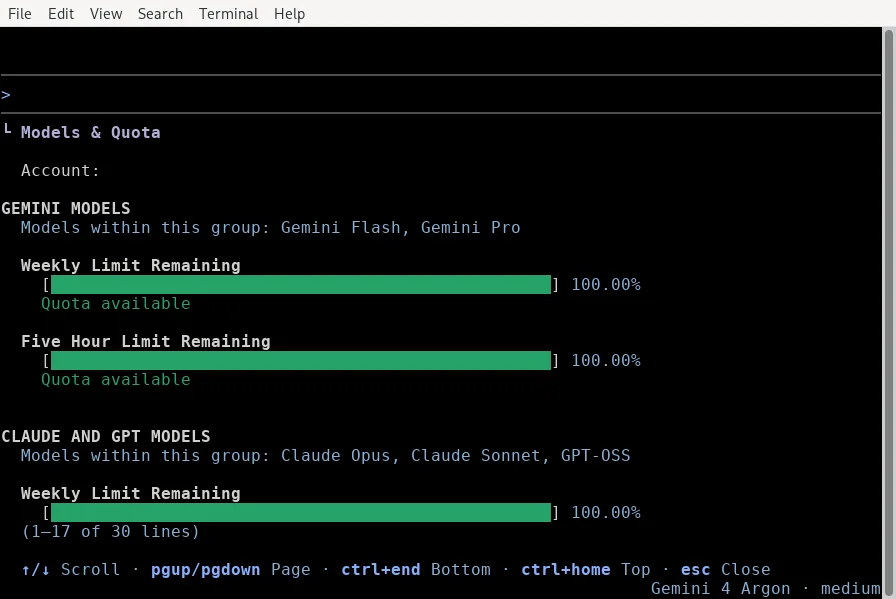
/usage in the CLI. Models are grouped, and each group shares a weekly limit and a five-hour limit. Switching within a group doesn't get you fresh quota. Image: Antigravity docs, retrieved November 2026. The current app may look different.1Check where you stand
In the app, quota usage by model is on the Settings page. In the CLI, use /usage. The CLI status line also shows remaining credits.
2Decide about overages
The AI Credit Overages setting has two options. Never waits for your quota to refresh. Always spends purchased credits automatically when quota runs out, at standard Gemini Enterprise consumption pricing. In the CLI, this is Use AI Credits, or useG1Credits in settings.json.
3Use a lower thinking level
Choose Low, Medium or High next to the model. Google describes this as balancing speed for quick edits against deeper reasoning for complex work. Using Low for simple tasks to save quota is a rule of thumb, not a Google figure.
Some models leave soon. The docs list Claude Sonnet 4.6, Claude Opus 4.6 and GPT-OSS-120b for removal on 18 November 2026, so don't build a workflow around them.
Trials don't include everything. Claude 5.5 models need a non-trial Pro subscription. To switch, you submit a request to cancel your trial. Partner, Pixel Pass and Google Fi memberships are managed separately.
Can I use my Antigravity login in other tools?
No. The FAQ names Claude Code, OpenClaw and OpenCode, and says using third-party software to access Antigravity violates the terms and can lead to suspension or termination.
Headless mode has limits too. agy -p is meant for direct scripting and CI. The FAQ says wrapping agy inside third-party coding agents or apps, or automating account rotation, isn't supported on consumer plans.
Is my code private?
Not automatically. The terms say Google records interactions to improve its products and machine learning, and that employees and contractors may review them.
- Open Settings and limit data collection. The FAQ says you can opt out at any point.
- Understand what stays on: the terms say Google still uses your data to provide the service, process feedback and keep it safe.
- Don't submit confidential information or anything you wouldn't want a reviewer or model training to see. That's the terms' own advice.
- To ask for interactions to be deleted, email the support address listed in the terms.
Teams get different terms. Gemini Enterprise accounts fall under Google Cloud terms, with options including US and EU data residency, VPC Service Controls and request logging. Third-party models also carry their own terms, and the Antigravity terms say Anthropic models fall under Anthropic's commercial terms.
You remain responsible for the agent. The terms make you solely responsible for AI agent actions, for authorizing their access to data and systems, and for supervising them in production.
Why can't I sign in?
Usually it's your region, your age or a Workspace account that hasn't been given access.
| Account | Likely cause | What to do |
|---|---|---|
| Personal | Unsupported region | Check the FAQ's list. The account must be tied to a listed country. |
| Personal | Age unverified | You must be 18 or older. Verify your age to continue. |
| Google Workspace | Not provisioned | Ask your admin, or use a personal Google Account |
| Gemini Enterprise | No license or role | Choose Business account, and ask your admin for a license |
| Gemini Enterprise | AI developer tools off | Your admin must turn them on for your region |
| Any enterprise | Using the standalone IDE | Enterprise sign-in works in the app, the CLI and the extensions instead |
Can't buy a plan? Google One AI plans aren't available everywhere. The FAQ's list includes Kosovo, Montenegro and Türkiye. Antigravity itself can still be available in those places, as Kosovo and Montenegro appear on the supported list, so you may be limited to the free quota.
How do I move from Gemini CLI or Firebase Studio?
Run agy where your old setup lives, and it offers to convert it. A few paths change, and you have to move those yourself.
| Item | Gemini CLI | Antigravity CLI |
|---|---|---|
| Workspace skills | .gemini/skills/ | .agents/skills/. Move them manually. |
| Global skills | ~/.gemini/skills/ | Same, or ~/.gemini/antigravity-cli/skills/ |
| Global MCP servers | ~/.gemini/settings.json | ~/.gemini/config/mcp_config.json |
| Workspace MCP servers | Inline settings | .agents/mcp_config.json |
GEMINI.md, AGENTS.md | Used | No change |
| Extensions | Extensions | Plugins: agy plugin import gemini |
From Firebase Studio. Click Move now at the top of your workspace, then follow the export steps. You'll need Antigravity IDE, Node.js 20 or later and Firebase CLI 15.10.0 or later on your own machine, because Antigravity runs locally rather than in a cloud editor. You still deploy with the Firebase CLI.
Hidden tips
Details that are easy to miss, each with the official page that backs it up.
-
Long jobs keep your laptop awake
If an agent is running, Antigravity prevents your computer from sleeping. Worth knowing before you close the lid on battery power.
FAQ -
Broaden a permission before you click
On a permission card, you can edit the target first, for example widening a single file to its parent folder, to avoid repeating prompts.
Agent permissions -
Changing model mid-turn waits
If you switch model while the agent is running, it keeps the old model until that turn finishes or you cancel.
Choose a model -
Images use a model you can't change
When the agent makes mockups, images or diagrams, it uses Nano Banana 2, which isn't customizable, so you can't change it in the model picker.
Choose a model -
Windows paths are normalized
Before checking rules, Antigravity strips drive letters such as
Agent permissionsC:and converts backslashes to forward slashes, so one rule set works across systems. -
Chains prefix-match, substitutions don't
With
Agent permissionscommand(git)allowed,git status && git logruns freely, but anything using command substitution needs an exact rule. -
Capture clean script output
In headless mode, the answer goes to
Headless modestdout, while errors, authentication prompts and progress go tostderr, so you can pipe the result safely. -
Open cloud conversations from anywhere
Remote agents are rolling out to Pro and Ultra subscribers. Conversations in a cloud project run in the cloud and open at
Changelogantigravity.google.com/remote. -
Rollouts arrive slowly
New versions can take a few days to reach everyone, and features such as voice mode roll out gradually. A missing feature may simply not have reached you.
Changelog
Google Antigravity FAQ
Is Google Antigravity free?
Yes, there's a $0 plan with access to Gemini 3.8 Flash and other models, unlimited Tab completions and a weekly quota. Google AI Pro and Ultra give higher limits, and business access runs through Google Cloud.
What is the difference between Antigravity App and Antigravity IDE?
The app is a command center for managing multiple local agents, projects and scheduled tasks. The IDE is a full code editor with an agent side panel. Enterprise sign-in works in the app, CLI and extensions, but not the standalone IDE.
Can I use my own API key in Antigravity?
No. The plans page says bring-your-own-key and bring-your-own-endpoint aren't currently supported for additional rate limits. Pro and Ultra users can buy AI credits for overages.
Why does Antigravity say my quota is used up?
Quota follows the amount of work, so complex tasks use more. Free plans refresh weekly, while Pro and Ultra refresh every five hours up to a weekly limit. Check Settings or run /usage in the CLI.
Is Turbo mode safe?
Turbo turns off the terminal sandbox, runs commands with no restrictions and gives the agent full filesystem access. Use Default or Auto unless you have isolated the machine some other way.
Can I use Antigravity with Claude Code or OpenClaw?
Not with your Antigravity login. Google's FAQ says that violates the terms and can lead to suspension or termination. It recommends a Gemini Enterprise or Google AI Studio API key for third-party agents.
Does Antigravity use my code for training?
The terms say Google uses interactions to improve its products and machine learning, and people may review them. You can limit this in Settings, and the terms advise against submitting confidential information.
Sources
Facts checked 6 November 2026. Products change, so confirm anything important on the official pages.
- Antigravity docs
- Choose your Antigravity
- Plans
- Pricing
- Choose a model
- Agent permissions
- Terminal sandbox
- Agent settings
- Plan command
- Boost command
- Review changes
- Model quotas command
- CLI AI credits
- Headless mode
- CLI troubleshooting
- Migrating from Gemini CLI
- Firebase Studio migration
- FAQ
- Changelog
- Terms