How to use Bolt.new
Bolt turns a prompt into a working JavaScript website or app in your browser, with hosting and a database built in. Most complaints come down to token use, so learning what spends tokens matters more than prompt tricks.
The short version
- Most tokens go on Bolt reading your project, not on your prompt. Larger projects cost more per message.
- Stuck on an error? Stop clicking Attempt fix. Each try uses tokens. Ask for detailed logging, or restore from Version history, which is free.
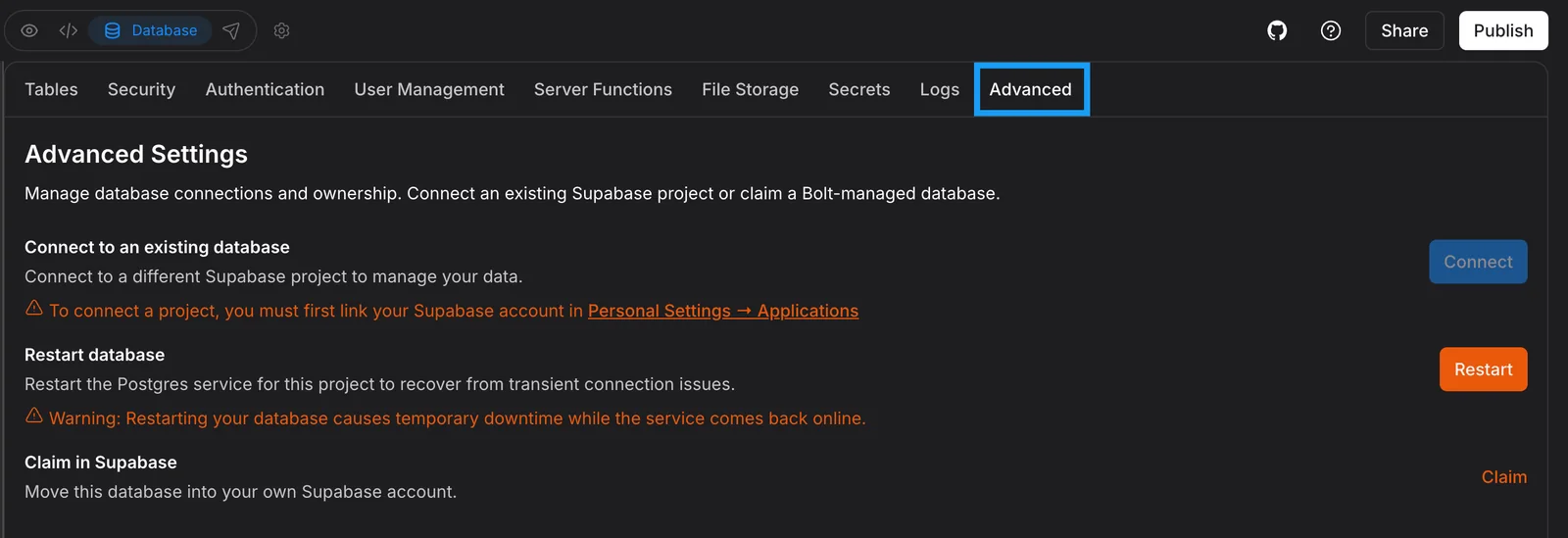
- Decide on Supabase before you start. Connecting it later to a project with a Bolt database can lose data, so Claim the database instead.
- Connect GitHub early. Your code is yours, and GitHub keeps a copy outside Bolt.
At a glance
- What it is
- Browser-based AI app builder
- Made by
- StackBlitz
- Free plan
- 1M tokens a month, 300K a day
- Pro starts at
- $25 a month for 10M tokens
- Backend languages
- JavaScript only
- Code ownership
- Yours, including commercial use
Official links
Is Bolt right for me?
Good fit if
- You want a working website or app with no local setup
- You want sign-in, a database and hosting without creating other accounts
- You work in JavaScript or can live with Node.js as your only backend
- You want to keep your exit open through GitHub and a claimable database
Look elsewhere if
- Your backend must be PHP or Python, which Bolt doesn't support
- You need to drive it from a script, because there's no public API, CLI or SDK
- You want predictable costs on a large codebase, since big projects cost more per message
- You work mainly in Safari or on a phone, where key tools are limited or missing
How do I build my first app?
Paste a prompt, wait about five minutes and try it in the preview. Bolt's own quickstart uses just under 300K tokens, which is a whole day's allowance on Free.
- Open bolt.new in Chrome or another Chromium browser. Bolt runs there fully, and Safari has limits.
- Click Plan and talk through the idea first. Plan mode doesn't change your code and uses fewer tokens.
- Send your first prompt, then sign up with Google, GitHub or email. No card is required.
- Test the app in the preview. Bolt's example with sign-in and saved favorites took about five minutes, because databases take longer to set up.
- Go to Account settings and turn on Display token usage in chat, so you can see what each prompt costs.
- Click Publish when it's ready. You get a free
bolt.hostaddress, and the button doesn't use tokens.
The first prompt from Bolt's quickstart
Build a pet name picker app with dropdowns that allow people to choose animal types (e.g. dog, cat, bird, lizard, etc.) and name categories (e.g. cute, celebrity puns, movie inspired, etc.) Create user email sign up and log in functionality and the ability to save favorite names when logged in.Building for phones? Include the words mobile app in your first prompt, so Bolt sets up an Expo-compatible project from the start.
Why does Bolt use so many tokens?
Bolt says most of your token use comes from reading, understanding and syncing your project files. So a short prompt on a big project can cost more than a long prompt on a new one.
- Your promptPlus any uploaded files
- Recent chatUntil you
/clearit - Project filesThe biggest share
- New codeWhat Bolt writes back
| Free of tokens | Uses tokens | Cheaper way to do it |
|---|---|---|
| Publish button | Asking Bolt to publish | Click the button |
| Version history restore | Asking Bolt to undo a change | Restore the earlier version |
| Editing code yourself in Code view | Asking for a one-word change | Edit the file directly, on desktop |
| Run security audit in the Publish menu (paid plans) | Prompting Bolt to audit | Use the menu button |
Running npx knip in the terminal | Asking Bolt to remove unused files | Run it yourself if you're comfortable |
Habits Bolt recommends
- Use Plan mode for questions and debugging
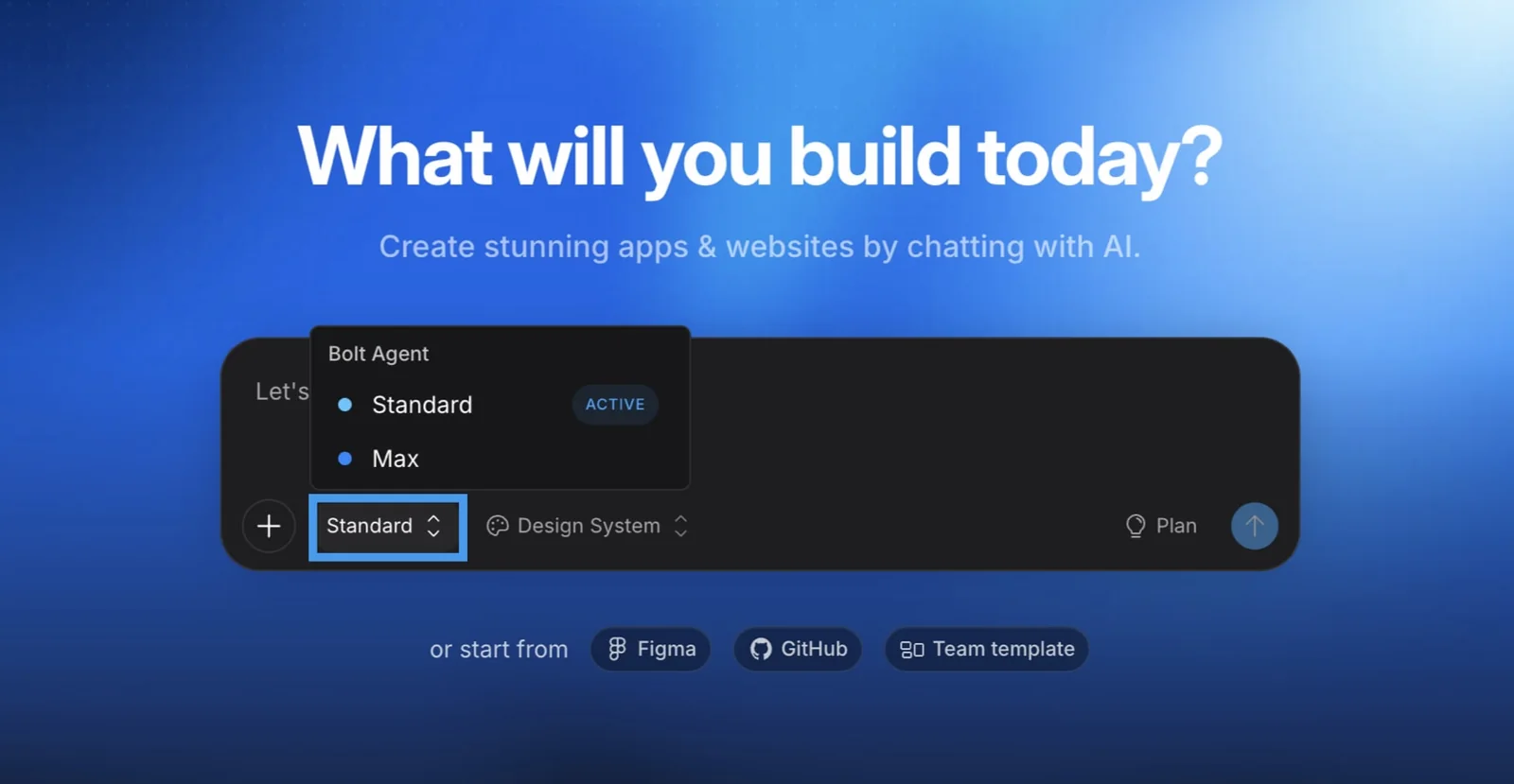
- Choose Standard for clear tasks. Max thinks harder and uses more
- Tell it which files or functions to look at
- Add one feature at a time, and test it
- Turn on connectors only when you need them
- Keep long prompts for new projects, and shorten them as the project grows
What quietly costs more
- Clicking Attempt fix over and over
- Using Max on simple tasks
- Markdown files Bolt adds for its records, which are read on every prompt
- Files of thousands of lines
- Uploaded files, which add to context even if they aren't stored in the project
- Large images, which stay in the chat history
How do I get out of an error loop?
Stop retrying. Bolt says a second click on Attempt fix sometimes works, but warns against clicking it over and over. Give it better information instead.
1Roll back if you can
Click Version history (the clock icon), preview a version and click Restore this version. Bolt saves a version after every prompt it processes. You can also bookmark and rename versions, so mark the good ones before a risky change.
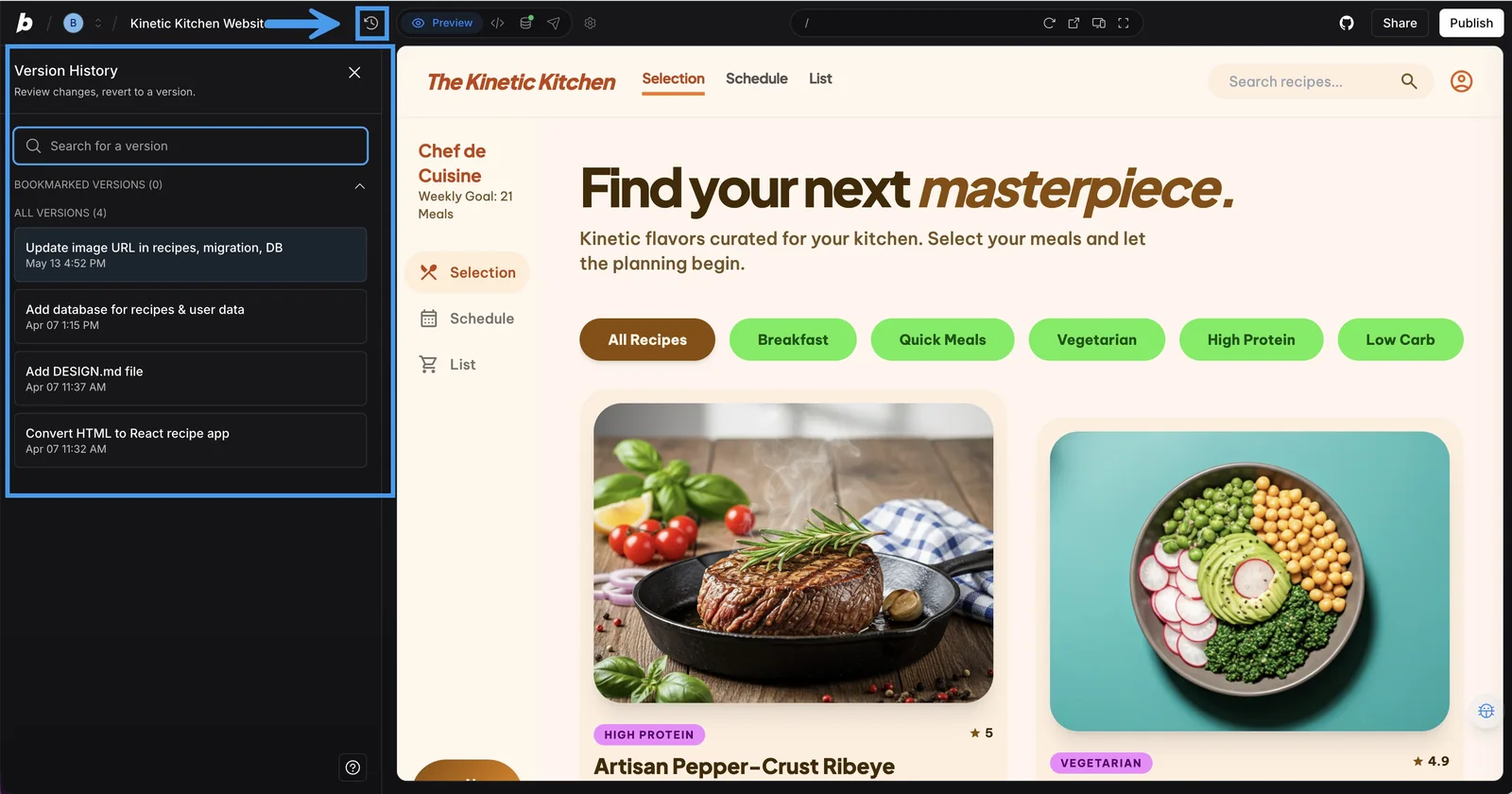
Restoring doesn't undo database changes. Bolt says restoring an earlier version won't change your Bolt or Supabase databases. So old code can end up running against a newer database. If a restore doesn't help, check whether the database has changed since that version.
2Ask for logging, then bring back the evidence
Prompt Bolt to enhance error handling and add detailed logging around the problem. Open the app in a separate tab, reproduce the error and read the browser console. Bolt's help gives CMD + OPTION + J on Mac and CTRL + SHIFT + I on Windows. Paste the logs into the chat.
3Switch to Plan mode
Ask focused questions and agree a fix before anything changes. Plan mode reads your codebase and can search the web, showing sources at the top of its reply. When you're happy, Implement this plan switches back to building.
4Clear the context
Type /clear and click Clear context. This resets Bolt's recent memory, not your files. Bolt can often get unstuck this way. Keep a README.md that describes the project, so you can ask Bolt to read it after clearing.
5Try the other agent
Max suits complex, open-ended problems and large codebases, and it's available on paid plans. Bolt says it responds well if you describe a specific problem and ask it to think carefully. For tasks Standard already handles well, it may make no noticeable difference.
| What you see | Likely cause | Fix |
|---|---|---|
| Blank, gray or white preview | Preview problem | Hard refresh, open in a new tab, then prompt The preview is not showing, fix this. |
| Supabase URL errors in the console | The project expects a connection that isn't set up | Connect the database from Advanced |
| Database table permissions error | Bolt tables are private by default | Ask Bolt to fix the permissions |
| Missing secrets | A server function needs a credential | Database > Secrets. It works right away, with no redeploy. |
| Webhook authorization errors | Stripe or GitHub send no JWT | Turn off JWT verification for that function and validate a signature yourself |
| 403 or 404 on Bolt assets | Extensions, VPN or antivirus | Turn off ad blockers and your VPN, and check your antivirus |
Why does it get slower and less accurate as the project grows?
Too much context. Bolt warns that an overfull context can cause errors, slower responses and lower-quality results, and it's also what the "project exceeds total supported prompt size" error points to.
- Back up first. Download your project before any cleanup.
- Remove what's unused. Prompt
Remove any unused files and components from this project. - Trim the notes. Prompt
Look at the number of .md files in this project and keep only the ones that have necessary project context. - Split big files. Ask for a list of files over about 700 lines, then refactor them one at a time, testing after each.
- Check dependencies. In the Code view terminal, run
npx depcheckto find unused packages andnpm dedupeto remove duplicates.
Bolt's suggested refactor prompt
Please refactor [filename] by splitting it into multiple files. Keep the original file to act as a router so the app continues to function after the refactor. Add basic comments to these files to understand what each file and its parts are for.Bolt gives two thresholds. One help page says to split files over about 700 lines, and another says around 500 lines. Treat 500 to 700 as the range to watch. Refactoring costs tokens up front but reduces them afterward.
Use Knowledge for things that always apply. Chat history fades, and /clear wipes it, but project Knowledge persists. Bolt also reads an agents.md file automatically. It must have exactly that name and hold the main instructions.
Partial builds have the same cure. If Bolt dropped a feature or lost track, Bolt says the most common cause is one large, multi-part prompt. Make one change, check it, then move on.
Images have their own limit. With more than about 20 images in a chat and any over 3,000 pixels on its longest side, Bolt shows an error. Resize to 1,500 pixels before adding them in Code view, and use /clear if you hit the error.
Should I use Bolt Database or Supabase?
Bolt recommends its own database for most projects, because it works with no setup on every plan. Choose Supabase, from the start if you can, when you need SQL editing, outside tools or advanced monitoring.
| Bolt Database | Supabase | |
|---|---|---|
| Plans | All plans, unlimited databases | Pro and Teams |
| Setup | Automatic | Connect one Supabase organization |
| Sign-in | Email and Google | Supabase user management |
| Server code | Server functions | Edge functions |
| SQL and outside tools | A Query button on each table runs SQL | Supabase's own SQL editor, tools and monitoring |
| Restart from Bolt | Yes | Yes |
| Restored by Version history | No | No |
1Connect your account once
Click your project name, then All project settings > Applications > Connect in the Supabase row, and authorize Bolt. Choose the organization carefully. A Bolt account connects to one Supabase organization, and you can disconnect but not change which one it is.
2Check what Claim needs
Before you claim
- You must be the Supabase org owner
- You need a Pro or Teams plan on Bolt
- On a Team, only owners, co-owners and admins can use Advanced
What you can't do
- Move back: there's no supported Supabase to Bolt Database flow
- Keep leaked password protection on a free Supabase plan: claiming turns it off
- Restore a Supabase database from Version history
- Connect or Claim from Free: the buttons say Upgrade to Pro to unlock
3Add sign-in and check your security rules
Prompt Bolt to add authentication, then sign up in your own app and confirm the user appears under Authentication > Users in Supabase.
If row-level security misbehaves, returning nothing or exposing too much, Bolt suggests prompting it to remove all rules on that table, then adding the right one back with a specific instruction such as "only allow users to view rows where user_id matches their authenticated ID". Test afterward, and check RLS is enabled in Supabase.
Run the security audit before launch. Paid plans get a Run security audit button in the Publish menu that uses no tokens, and it checks who can see and change data. Free plans still get a database security check.
Can I take my code and data off Bolt?
Yes. Bolt says all code you create is yours to use for any legal purpose, including commercially. Sync to GitHub, download a ZIP, and claim your database if you need it elsewhere.
| Route | What it gives you | Limits |
|---|---|---|
| GitHub sync | A full history outside Bolt, updated automatically | Owner only. You merge branches on GitHub. |
| Download | A ZIP of project files | Desktop only |
| Netlify | Publishing from Bolt to your Netlify account | No database or traditional backend |
| Claim in Supabase | Your database in your own Supabase account | Pro or Teams, and Supabase org owner |
| Tables export | Selected rows as CSV or JSON | Manual, table by table |
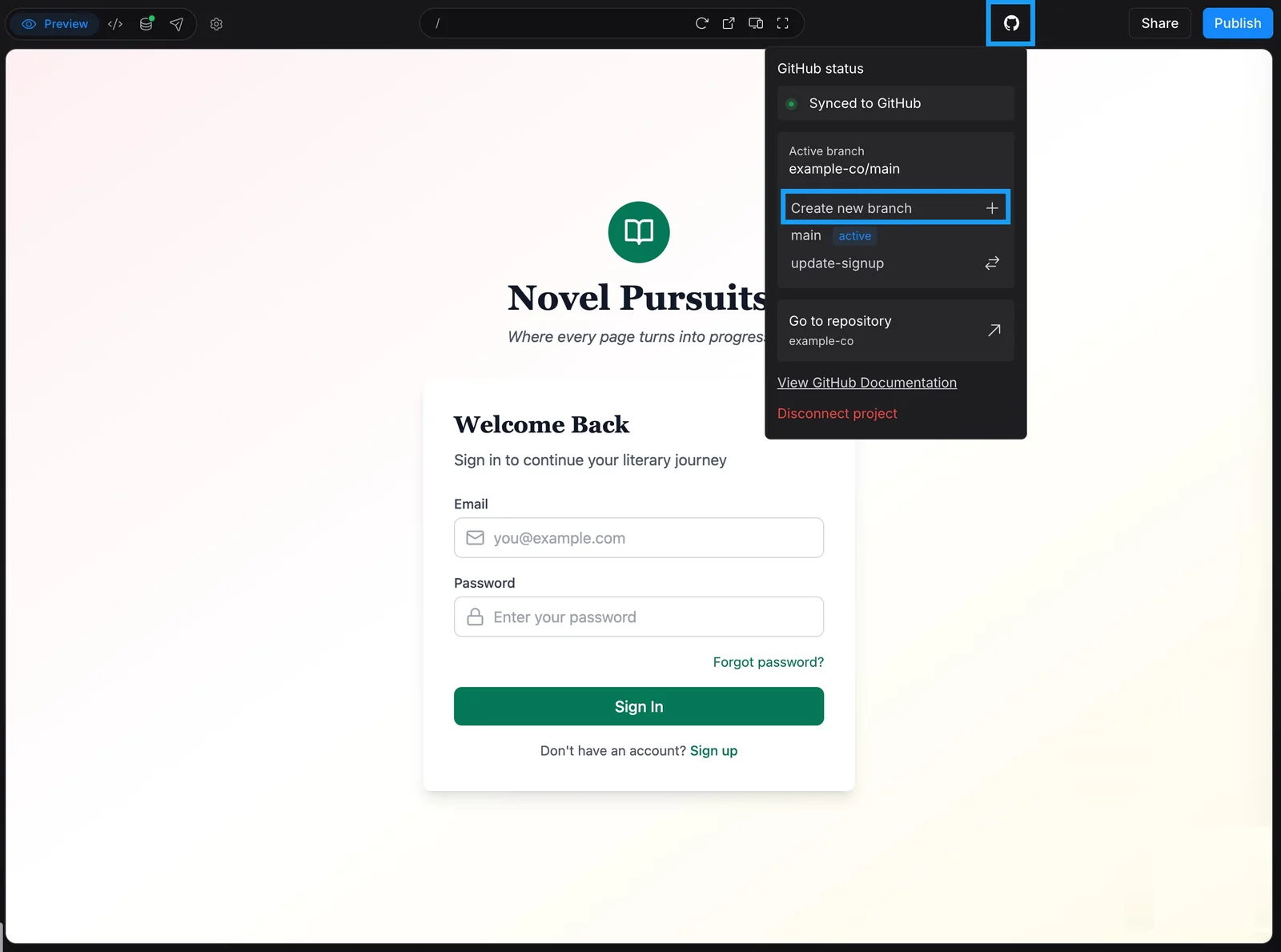
How the sync behaves. Bolt commits after every change that doesn't break the project, and checks GitHub every 30 seconds for outside updates. So you can edit in your own IDE, push, and carry on in Bolt. If both change at once, you get a GitHub conflict message and two choices: Pull and resend last message or Pull and discard last message.
GitHub traps
- Disconnecting a project is permanent, and you need support to reconnect it to the same repo
- Only the project owner can manage the link
- Collaborators' changes sync the next time the owner opens the project
- You can't import an empty repo, and you need push permission
- A GitHub account used to sign up can't be separated from that Bolt account's integration
Rule of thumb, not a Bolt rule: connect GitHub before your project matters, so a full history exists outside Bolt from early on.
Hosting elsewhere. With your code on GitHub, Bolt says you can publish through other services. For Netlify, the project must be unpublished before you can change the Hosting Provider, and custom domains don't carry over. To restore a downloaded copy into Bolt, the route goes through a new StackBlitz project and Open in bolt.new.
Coming from Lovable? Bolt's route is to sync the Lovable project to GitHub, then import that repository into Bolt. You can also start from a Figma or Google Stitch design.
 Watch: Vibe Coding Security - Using Bolt.New for version control & security - Workshop #3Official video from Bolt.new.
What does Bolt cost, and what happens to unused tokens?
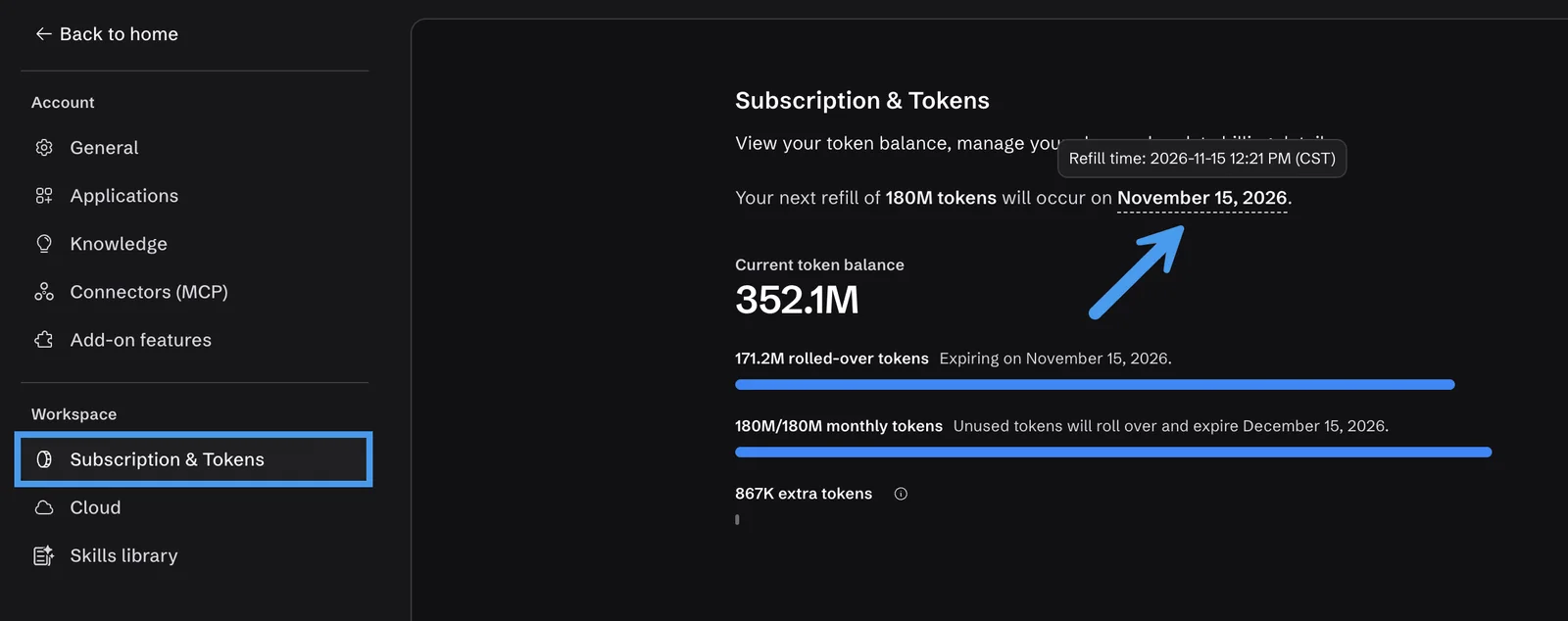
Free gives you 1M tokens a month, capped at 300K a day. Pro starts at $25 a month for 10M tokens, and you move up a slider for more. Subscriptions aren't refundable.
| Free | Pro | Teams | |
|---|---|---|---|
| Price | $0 | From $25 a month | From $30 per member a month |
| Tokens | 1M a month, 300K a day | From 10M a month, no daily limit | Each member has their own |
| Unused tokens | Don't roll over | Up to 2 months | Stay with the member |
| Agents | Standard | Standard and Max | Standard and Max |
| Database | Bolt | Bolt or Supabase | Bolt or Supabase |
| Custom domain | No | Yes | Yes |
| Badge on site | Made in Bolt | None | None |
| Hosting | 10 GB, 333,333 requests | 30 GB, 1M requests | Pro hosting |
Token rules worth knowing
- Oldest tokens are used first
- Allocations last 2 months, while you stay subscribed
- Paid refills happen at your billing time, fixed in UTC, not at midnight
- Upgrades mid-cycle expire 2 months from the cycle's start, not from the upgrade
- Reload tokens never expire, but only the top monthly Pro plan and any annual Pro plan can buy them
Traps
- Canceling loses all tokens when the cycle ends, unless you resubscribe before they expire
- Downgrading an annual plan waits until the renewal, up to a year away
- Used over 1M in a month, then canceled? No Free tokens until the next month
- Collaborators who edit use their own tokens, and free team members can't send prompts
- A failed payment past the retry period reverts you to Free and loses rollover tokens
Hit the daily limit on Free? You can still edit code directly in Code view, which uses no tokens. The daily allowance doesn't accumulate.
Hosting limits are per account, not per site. All your published sites share one allowance. Free sites go offline for the rest of the month when they pass it, with no way to buy more. Pro can pay as you go, up to a limit set under Settings > Cloud > Change spending limit.
What about Bolt Forge and Lite? The docs describe Forge, an agent using open-source models, as a preview from 14 September to 14 October 2026, with a $9 Lite plan open until that date. Access on Pro was due to end then, and Lite isn't on the pricing page viewed on 6 November 2026. Forge prompts are used to train open-source models, except for sessions from the EEA, UK and Switzerland. Check whether it's still offered.
What can't Bolt do?
Bolt runs on WebContainers, a development environment inside your browser, so it's limited to JavaScript. Other limits depend on your browser and device.
| Situation | What's limited |
|---|---|
| Backend language | Node.js only. PHP and Python aren't compatible. |
| Automation | No public API, CLI or SDK |
| Safari on a Mac | Files are read-only in Code view, no terminal, and previews are hosted |
| Phone or tablet | No Code view, visual edits, database panel or downloads |
| Expo login in the Bolt terminal | socket hang up or a localhost error. Add an EXPO_TOKEN secret instead. |
| Editing together | Works in real time, but only owners and co-owners can see secrets |
Hidden tips
Details that are easy to miss, each with the official page that backs it up.
-
Track each prompt's cost
Display token usage in chat in Account settings shows your balance above the chatbox, so you can see which requests are expensive.
QuickStart -
Paste a path instead of re-uploading
If an attached image won't show, drag it into the
Bolt issuesPublicfolder in Code view, click Copy relative path, and name the path in your prompt. -
Reset, then re-brief with a README
When changing area, use
Bolt issues/clear, then ask Bolt to read yourREADME.mdand give your new instructions. It focuses the agent without losing the project summary. -
Duplicate before risky experiments
Bolt recommends duplicating an important project before trying experimental models. Doing the same before a big refactor is a rule of thumb, not Bolt's advice.
Bolt Forge -
Lost projects are usually in another workspace
Check the workspace checkmark under your account name, then your sign-in method. Every project also appears in your Bolt collection on StackBlitz.
Bolt issues -
Raise your hosting cap before a launch
Pro sites pause when they reach your pay-as-you-go limit. Bolt suggests raising it ahead of a launch or viral moment to avoid downtime.
Hosting plans -
Use the same image rules in chat and Code view
Bolt resizes large images attached in chat, but files added in Code view aren't covered by that. Resize them to 1,500 pixels yourself first.
Manage project context -
Secrets work straight away
A secret added under Database > Secrets is available to server functions immediately. Tell Bolt you've added it, so it can continue or test.
Integrations issues -
Stop a claimed database going missing
If a claimed database isn't in the Select your database dialog, disconnect and reconnect Supabase under Settings > Applications to refresh the list.
Supabase
Bolt FAQ
How do I stop Bolt using so many tokens?
Use Plan mode for questions, keep prompts focused on specific files, add one feature at a time, and clear context with /clear between tasks. Remove unused files, split files over about 500 to 700 lines, and use buttons such as Publish and Version history, which use no tokens.
How do I fix a Bolt error loop?
Stop clicking Attempt fix repeatedly. Restore an earlier version if a recent change caused the problem, ask Bolt to add detailed logging, paste the console output back, and use Plan mode to agree a fix before changing code.
Does Bolt work with Supabase?
Yes, on Pro and Teams plans. You can choose Supabase when starting a project, connect an existing database, or claim a Bolt database into your Supabase account. Connecting Supabase to a project with a Bolt database can cause data loss, so claim instead.
Can I export my code from Bolt?
Yes. Connect GitHub to sync automatically, or use Download on desktop for a ZIP. Bolt says the code you create is your own and can be used for any legal purpose, including commercially.
Do Bolt tokens roll over?
On paid plans, unused tokens last up to two months while you stay subscribed, and the oldest are used first. Free plan tokens don't roll over. Reload tokens don't expire.
Can I get a refund from Bolt?
Bolt's help center says subscriptions are non-refundable, as stated in its Terms of Service. You can cancel any time, and your plan stays active until the end of the billing period.
Does restoring a version in Bolt restore my database?
No. Bolt says restoring an earlier project version won't change your current Bolt or Supabase databases, so check whether your older code still matches your database.
Sources
Facts checked 6 November 2026. Products change, so confirm anything important on the official pages.
- Bolt Help Center
- Bolt pricing
- Tokens
- Maximize token efficiency
- Manage project context
- Plan Mode
- Choose an agent
- QuickStart guide
- Supabase for databases
- Advanced database settings
- GitHub for version control
- Version history and GitHub
- Backups and version history
- Netlify for hosting
- Check your project's security
- Corporate and commercial
- Billing
- Hosting plans
- Bolt Forge
- Bolt issues
- Database issues
- Integrations issues
- Supported technologies
- FAQs