
Node-based generative AI
How to use
ComfyUI.
Building reproducible node graphs for image, video, audio, and other generative workflows with precise control over models and parameters.
Inside the product
See the working surface.
A current first-party interface reference, preserved locally with its source and capture date.
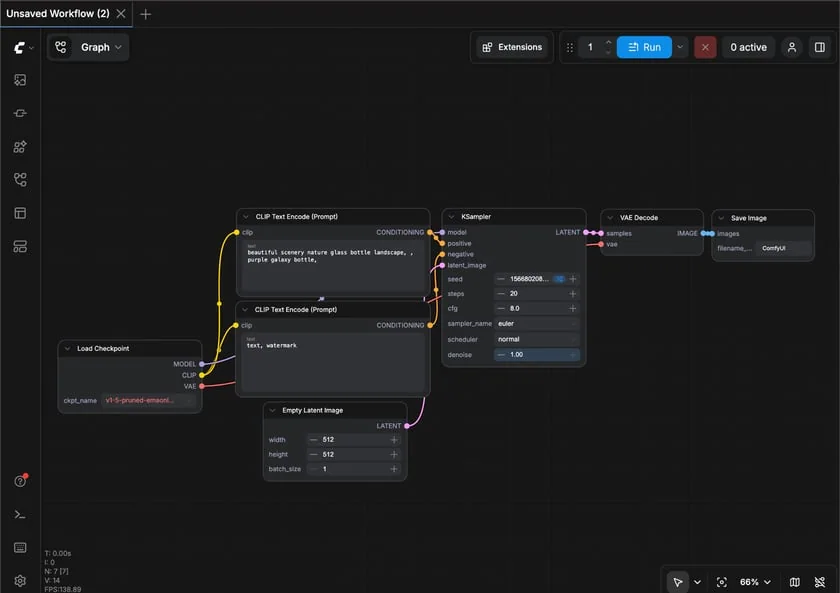
A basic ComfyUI text-to-image graph makes the model, prompts, sampler, decoder, and output path explicit.
Interface reference · ComfyUI first-generation documentation ↗ · Captured August 2, 2026ComfyUI is a open-source node-based generative AI interface and inference engine. Building reproducible node graphs for image, video, audio, and other generative workflows with precise control over models and parameters. This guide covers the whole path in one place: official access, a first session that produces something reviewable, the checks that make output trustworthy, and the permissions worth limiting before you connect real work.
AI should make the work easier to inspect. If the workflow removes the source, the owner, or the review step, redesign the workflow.
Access & setup
Find, install, and sign in to ComfyUI
Get into the official ComfyUI experience with the right account and a setup you understand.
- 01
Start at https://www.comfy.org/ and confirm the domain before entering account or payment information.
- 02
Availability: Official desktop and manual installations for supported Windows, macOS, and Linux environments, plus cloud-oriented APIs and services.
- 03
Compatible hardware and operating system for the selected installation, sufficient storage for models, and careful dependency management for custom nodes.
- 04
Sign in with the account you intend to keep using, then review plan, data, notification, and permission settings.
- 05
Run one low-risk test task before connecting sensitive files, repositories, or workspace data.
- Use official download pages.
- Review permissions during setup.
- Keep installers and applications updated.
First session
Your first useful ComfyUI session
Learn the interaction loop using a small task with a clear outcome.
- 01
Install ComfyUI from an official source and open a built-in Workflow Template using only Core nodes.
- 02
Download the required licensed model and trace the graph from inputs through sampling to saved output.
- 03
Run with a fixed seed and record model, sampler, scheduler, dimensions, steps, and conditioning.
- 04
Save the workflow and verify it reopens before adding any third-party custom nodes.
- State the outcome before the background.
- Provide the real source material.
- Review the result before expanding the task.
Quality control
Check the quality of ComfyUI output
Establish that a model's output is reliable enough for the job you are handing it.
- 01
Restate the task, the acceptance criteria, and the failure cost before evaluating any response.
- 02
Test with a fixed evaluation set rather than ad-hoc prompts, so changes are measurable across model versions.
- 03
Check determinism and drift: record model version, parameters, and date, because providers update models underneath you.
- 04
Probe the failure modes deliberately — ambiguous inputs, adversarial phrasing, and out-of-scope requests.
- 05
Validate structure as well as content: confirm schemas, types, and required fields survive real inputs.
- Pin and record the model version with every result.
- Evaluate against a fixed set, not one-off prompts.
- Validate output structure before it reaches downstream code.
Privacy & permissions
Use ComfyUI safely
Understand what leaves your system on every call, and what the provider keeps.
- 01
Classify the data in each request before it is sent to a hosted model.
- 02
Check the provider's retention and training terms for your specific plan, not the marketing page.
- 03
Store API keys in a secret manager, scope them per project, and rotate them on a schedule.
- 04
Strip or tokenise personal and regulated data before it reaches the request body.
- 05
Set rate limits, spend caps, and monitoring so a runaway loop is bounded and visible.
- Custom nodes are executable third-party code and model files can have license or security risks. Use trusted sources, isolated environments, snapshots, pinned versions, and non-sensitive inputs during evaluation.
- Follow your organisation's approved-use policy.
- Never treat fluent output as authorization to act.
Core workflows
Step-by-step ways to use ComfyUI for the work it does best.
Each workflow below has its own outcome, steps and review checkpoints.
Understand and assemble the core node graph behind a controlled local image generation.
↓ 02 WorkflowInstall and audit a ComfyUI custom-node workflowOpen a third-party workflow without blindly installing code, models, or hidden dependencies.
↓Workflow 01
Build a reproducible first image workflow in ComfyUI
Understand and assemble the core node graph behind a controlled local image generation.
Outcome: Create a workflow that another authorized machine can reopen and reproduce.
- 01
Install the official build, confirm hardware support, and start from a built-in workflow template.
- 02
Trace model loading, positive and negative conditioning, latent creation, sampling, decoding, and saving nodes.
- 03
Choose a licensed model and record its exact file, version, sampler, scheduler, seed, dimensions, and steps.
- 04
Change one parameter at a time and inspect outputs for artifacts, prompt adherence, and resource use.
- 05
Save the workflow JSON and an output with embedded workflow metadata, then document required models separately.
A basic ComfyUI text-to-image graph makes the model, prompts, sampler, decoder, and output path explicit.
Interface reference · ComfyUI first-generation documentation ↗ · Captured August 2, 2026What good use looks like
- Start with Core nodes.
- Pin models and settings.
- Change one variable per experiment.
Workflow 02
Install and audit a ComfyUI custom-node workflow
Open a third-party workflow without blindly installing code, models, or hidden dependencies.
Outcome: Reproduce a shared workflow while controlling supply-chain and model risks.
- 01
Inspect the workflow image or JSON, list missing nodes and models, and identify its original source and license.
- 02
Create a snapshot or isolated installation before using ComfyUI-Manager to locate missing packages.
- 03
Review each custom-node repository, maintainer, recent commits, install scripts, permissions, and open security reports.
- 04
Install the minimum dependencies, restart, and run with non-sensitive test inputs while watching console and network behavior.
- 05
Save the working snapshot, exact versions, model hashes, and replacement plan for abandoned custom nodes.
What good use looks like
- Treat custom nodes as executable code.
- Snapshot before installation.
- Never load untrusted workflows with secrets available.
Official references
Check the current product documentation.
Features, plan limits, availability, and data controls change. These official pages are the starting points used for this guide.