
Voice and audio
How to use
ElevenLabs.
Producing voiceovers, designing or selecting voices, generating speech with controlled delivery, dubbing, sound creation, and audio localization.
Inside the product
See the working surface.
A current first-party interface reference, preserved locally with its source and capture date.
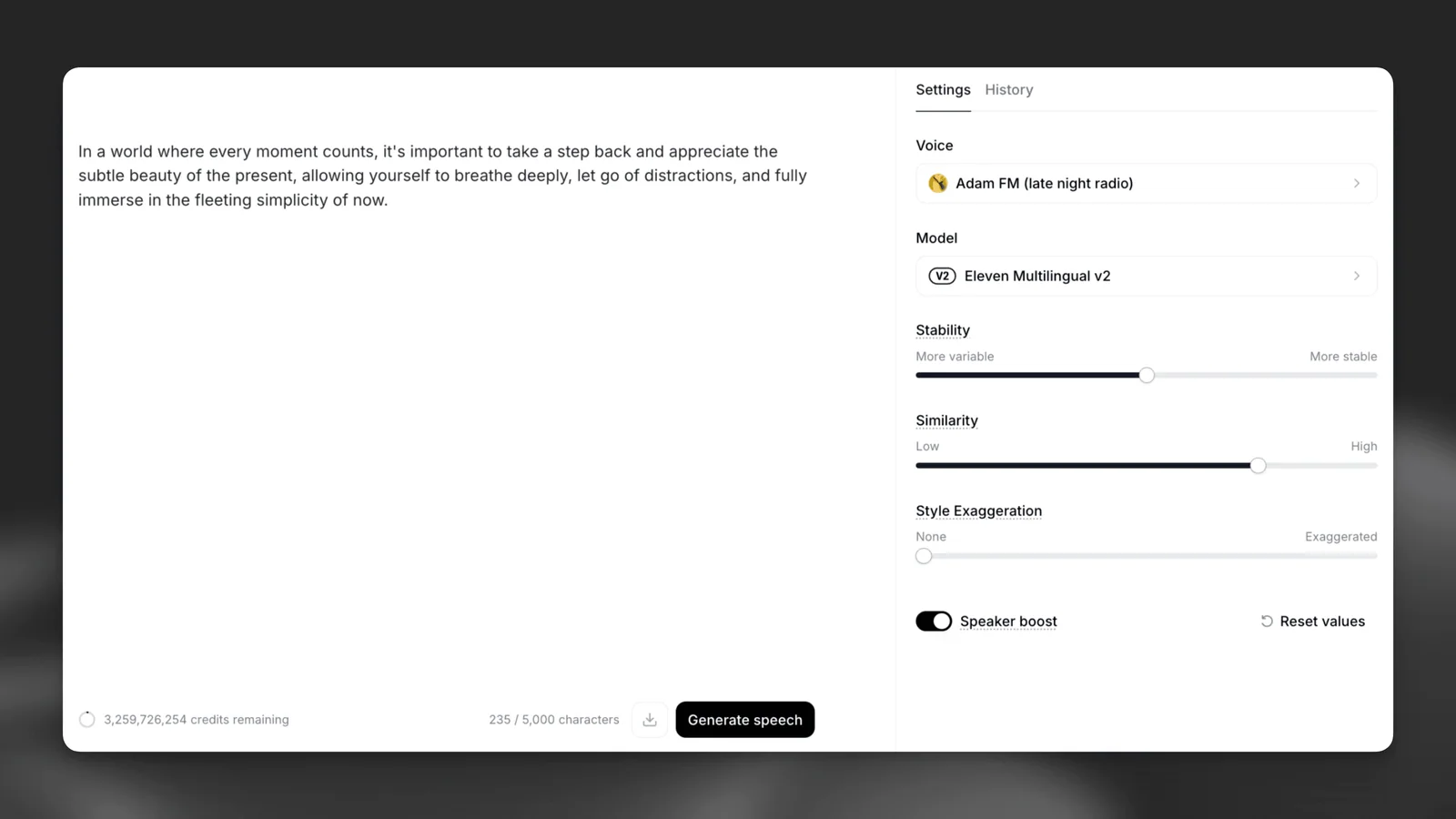
ElevenLabs’ Text to Speech screen keeps the script beside the voice and generation controls that shape the output.
Interface reference · ElevenLabs Text to Speech documentation ↗ · Captured August 2, 2026ElevenLabs is a AI voice, speech, dubbing, and audio platform. Producing voiceovers, designing or selecting voices, generating speech with controlled delivery, dubbing, sound creation, and audio localization. This guide covers the whole path in one place: official access, a first session that produces something reviewable, the checks that make output trustworthy, and the permissions worth limiting before you connect real work.
AI should make the work easier to inspect. If the workflow removes the source, the owner, or the review step, redesign the workflow.
Access & setup
Find, install, and sign in to ElevenLabs
Get into the official ElevenLabs experience with the right account and a setup you understand.
- 01
Start at https://elevenlabs.io/ and confirm the domain before entering account or payment information.
- 02
Availability: Full web platform plus official iOS, iPadOS, and Android apps; some advanced tools remain web-only.
- 03
Use elevenlabs.io in a modern browser for the complete toolset. ElevenLabs documents mobile apps for iOS 17 or later, iPadOS 17 or later, and Android 7 or later.
- 04
Sign in with the account you intend to keep using, then review plan, data, notification, and permission settings.
- 05
Run one low-risk test task before connecting sensitive files, repositories, or workspace data.
- Use official download pages.
- Review permissions during setup.
- Keep installers and applications updated.
First session
Your first useful ElevenLabs session
Learn the interaction loop using a small task with a clear outcome.
- 01
Sign in on the web or official app and choose a project with a script you are authorized to voice.
- 02
Select an appropriate voice and model, then generate a short test passage.
- 03
Adjust pacing, pronunciation, emotion, and formatting before generating the full script.
- 04
Review the export through real speakers or headphones and confirm consent, rights, and attribution.
- State the outcome before the background.
- Provide the real source material.
- Review the result before expanding the task.
Quality control
Check the quality of ElevenLabs output
Turn a promising generation into an asset you can legally and safely ship.
- 01
Restate the brief, the deliverable format, and where the asset will appear before judging any output.
- 02
Inspect at full resolution: generated media hides its errors at thumbnail size.
- 03
Check the details these systems reliably get wrong — hands, text, logos, reflections, symmetry, and edge artefacts.
- 04
Confirm the licence and commercial-use terms for your plan, and check the output does not reproduce a recognisable style, mark, or likeness you have no right to use.
- 05
Review for accessibility and delivery: alt text, contrast, colour profile, file size, and the exact export format.
- Inspect at full resolution before approving anything.
- Confirm commercial-use rights before an asset reaches a client.
- Keep the prompt and settings with the asset so it can be reproduced.
Privacy & permissions
Use ElevenLabs safely
Use the platform without surrendering rights, likenesses, or client material you do not control.
- 01
Confirm you hold the rights to every reference image, voice, or clip before uploading it.
- 02
Check whether your plan trains on submitted content, and opt out before uploading client work.
- 03
Never upload a real person's likeness or voice without their explicit, documented consent.
- 04
Review the output for marks, styles, or likenesses you have no licence to reproduce.
- 05
Label synthetic media where your client, platform, or jurisdiction requires disclosure.
- Voice cloning and realistic speech carry consent, impersonation, and disclosure risks. Use only voices and source material you are authorized to use, and review current platform policies before distribution.
- Follow your organisation's approved-use policy.
- Never treat fluent output as authorization to act.
Core workflows
Step-by-step ways to use ElevenLabs for the work it does best.
Each workflow below has its own outcome, steps and review checkpoints.
Prepare a script, choose a voice, direct delivery, and export audio that works in context.
↓ 02 WorkflowCreate or use a voice responsiblyEstablish consent, scope, and review before designing or cloning a voice.
↓Workflow 01
Produce a natural voiceover with ElevenLabs
Prepare a script, choose a voice, direct delivery, and export audio that works in context.
Outcome: Create a clear, appropriately paced voiceover ready for an editorial review.
- 01
Edit the script for spoken language, pronunciation, timing, and breathing before generation.
- 02
Choose an authorized voice that fits the audience and purpose.
- 03
Generate a short representative section and evaluate clarity, pacing, emphasis, and tone.
- 04
Adjust formatting, pronunciation, and voice settings before rendering the full script.
- 05
Listen in the final mix, fix discontinuities, and document voice consent and usage rights.
ElevenLabs’ Text to Speech screen keeps the script beside the voice and generation controls that shape the output.
Interface reference · ElevenLabs Text to Speech documentation ↗ · Captured August 2, 2026What good use looks like
- Direct the script, not just the slider.
- Test names and numbers early.
- Disclose synthetic speech when appropriate.
Workflow 02
Create or use a voice responsibly
Establish consent, scope, and review before designing or cloning a voice.
Outcome: Use synthetic voice without crossing identity or authorization boundaries.
- 01
Confirm whose voice or characteristics are involved and obtain explicit permission.
- 02
Define allowed projects, audience, duration, territories, and revocation terms.
- 03
Use the correct ElevenLabs cloning or voice-design workflow for the quality and consent level.
- 04
Secure source recordings and restrict who can generate with the resulting voice.
- 05
Review every public output for impersonation risk, disclosure, and contractual compliance.
What good use looks like
- Consent must be specific.
- Do not clone from found audio.
- Provide a clear revocation path.
Official references
Check the current product documentation.
Features, plan limits, availability, and data controls change. These official pages are the starting points used for this guide.