
Visual generation
How to use
Midjourney.
Exploring visual directions, generating art direction references, and iterating on image or video concepts from a clear creative brief.
Inside the product
See the working surface.
A current first-party interface reference, preserved locally with its source and capture date.
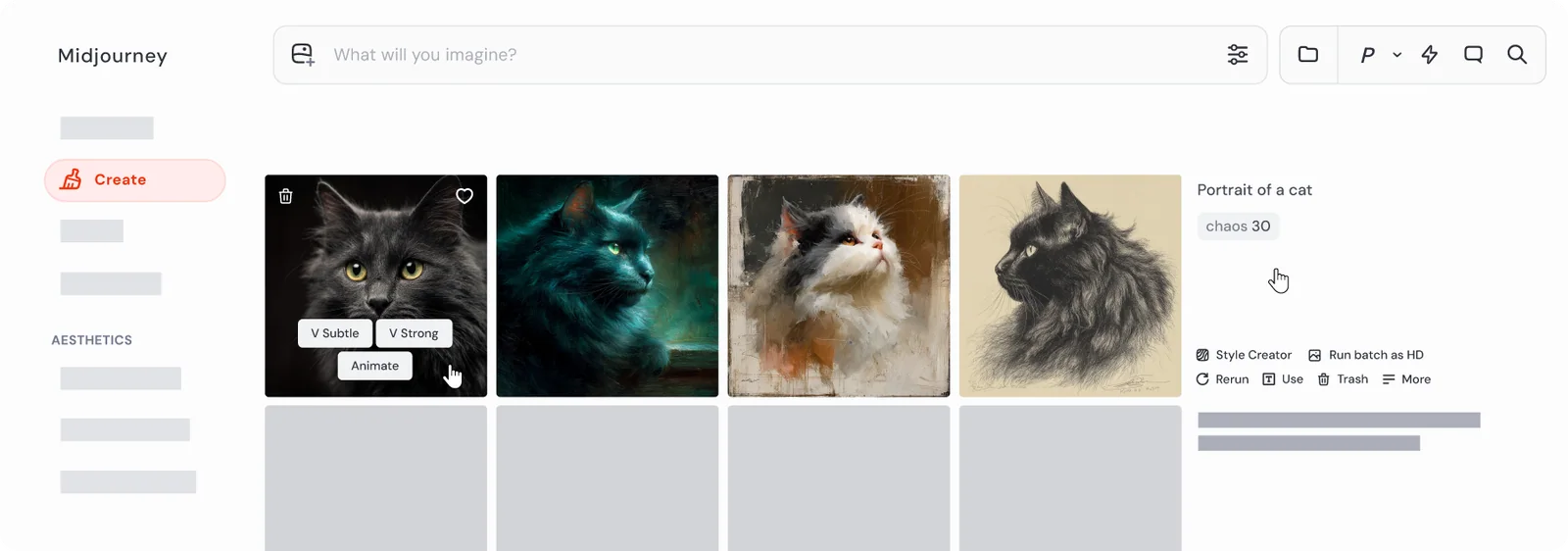
Midjourney’s Create page brings prompts, generations, variations, and editing controls into one working surface.
Interface reference · Midjourney Creating on Web documentation ↗ · Captured August 2, 2026Midjourney is a image and video generation platform. Exploring visual directions, generating art direction references, and iterating on image or video concepts from a clear creative brief. This guide covers the whole path in one place: official access, a first session that produces something reviewable, the checks that make output trustworthy, and the permissions worth limiting before you connect real work.
AI should make the work easier to inspect. If the workflow removes the source, the owner, or the review step, redesign the workflow.
Access & setup
Find, install, and sign in to Midjourney
Get into the official Midjourney experience with the right account and a setup you understand.
- 01
Start at https://www.midjourney.com/ and confirm the domain before entering account or payment information.
- 02
Availability: Midjourney's documented creation workflow is web-first.
- 03
Use a supported web browser and sign in to access the Midjourney website and creation tools.
- 04
Sign in with the account you intend to keep using, then review plan, data, notification, and permission settings.
- 05
Run one low-risk test task before connecting sensitive files, repositories, or workspace data.
- Use official download pages.
- Review permissions during setup.
- Keep installers and applications updated.
First session
Your first useful Midjourney session
Learn the interaction loop using a small task with a clear outcome.
- 01
Write a short creative brief: subject, composition, visual reference, output format, and what must not change.
- 02
Create a small set of directions rather than asking for one perfect image.
- 03
Inspect the result in the Create view, then refine one variable at a time: composition, style, lighting, or reference.
- 04
Use the Edit tools only after choosing the direction that best serves the original brief.
- State the outcome before the background.
- Provide the real source material.
- Review the result before expanding the task.
Quality control
Check the quality of Midjourney output
Turn a promising generation into an asset you can legally and safely ship.
- 01
Restate the brief, the deliverable format, and where the asset will appear before judging any output.
- 02
Inspect at full resolution: generated media hides its errors at thumbnail size.
- 03
Check the details these systems reliably get wrong — hands, text, logos, reflections, symmetry, and edge artefacts.
- 04
Confirm the licence and commercial-use terms for your plan, and check the output does not reproduce a recognisable style, mark, or likeness you have no right to use.
- 05
Review for accessibility and delivery: alt text, contrast, colour profile, file size, and the exact export format.
- Inspect at full resolution before approving anything.
- Confirm commercial-use rights before an asset reaches a client.
- Keep the prompt and settings with the asset so it can be reproduced.
Privacy & permissions
Use Midjourney safely
Use the platform without surrendering rights, likenesses, or client material you do not control.
- 01
Confirm you hold the rights to every reference image, voice, or clip before uploading it.
- 02
Check whether your plan trains on submitted content, and opt out before uploading client work.
- 03
Never upload a real person's likeness or voice without their explicit, documented consent.
- 04
Review the output for marks, styles, or likenesses you have no licence to reproduce.
- 05
Label synthetic media where your client, platform, or jurisdiction requires disclosure.
- Generated images need normal rights, brand, and factual review before publication. Read the current Midjourney terms before using output in commercial or sensitive work.
- Follow your organisation's approved-use policy.
- Never treat fluent output as authorization to act.
Models & pricing
What Midjourney costs, model by model.
Midjourney bills by fast GPU time rather than by image count, which is the single most misunderstood thing about its pricing. There is no free tier.
| Plan | Monthly | Annual (per month) |
|---|---|---|
| Basic | $10 | $8 |
| Standard | $30 | $24 |
| Pro | $60 | $48 |
| Mega | $120 | $96 |
Figures verified 2 September 2026 against Midjourney pricing ↗. Model pricing changes frequently — confirm before you budget.
| Provider | Frontier tier | Balanced default | Low-cost tier |
|---|---|---|---|
| OpenAI | GPT-5.6 Sol — $5 / $30 | GPT-5.6 Terra — $2 / $12 | GPT-5.6 Luna — $0.20 / $1.20 |
| Anthropic | Fable 5.1 — $10 / $50 | Sonnet 5 — $2 / $10 | Haiku 4.5 — $1 / $5 |
| Gemini 3.1 Pro — $2 / $12 | Gemini 3.1 Pro — $2 / $12 | Gemini 3.5 Flash-Lite — $0.15 / $1.25 |
Cross-provider comparison verified 2 September 2026. Sources: OpenAI API pricing ↗ · Claude platform pricing ↗ · Gemini API pricing ↗
Common questions
Midjourney questions people actually ask.
Does Midjourney have a free trial?
No. There is no free plan and no free trial, so the cheapest route to a first image is the $10 Basic tier.
How many images do I get with Midjourney?
Midjourney does not sell images; it sells fast GPU time. How many images a plan yields depends on model, resolution, and how often you upscale or vary. Plans with relax mode allow unlimited slower generations once fast hours are spent.
Core workflows
Step-by-step ways to use Midjourney for the work it does best.
Each workflow below has its own outcome, steps and review checkpoints.
Translate an idea into subject, composition, mood, material, and constraints before generating.
↓ 02 WorkflowRefine and edit a chosen Midjourney directionMove from exploration to controlled refinement without losing the composition that worked.
↓Workflow 01
Write a visual brief that produces useful directions
Translate an idea into subject, composition, mood, material, and constraints before generating.
Outcome: Generate distinct art directions that answer a real creative brief.
- 01
Define the use, audience, format, subject, and single most important visual idea.
- 02
Add composition, point of view, lighting, materials, and details that must be avoided.
- 03
Generate several deliberately different directions rather than minor variations.
- 04
Judge each direction against the brief, not against novelty alone.
- 05
Select one direction and change one variable per iteration.
What good use looks like
- Keep prompt language concrete.
- Separate content from style.
- Record the prompt and settings for chosen work.
Workflow 02
Refine and edit a chosen Midjourney direction
Move from exploration to controlled refinement without losing the composition that worked.
Outcome: Develop a selected image into a usable creative asset.
- 01
Choose the direction whose composition best solves the brief.
- 02
List what must remain fixed and what needs improvement.
- 03
Use variations for controlled exploration and editing tools for localized changes.
- 04
Check edges, hands, text-like details, perspective, and brand-sensitive elements at full size.
- 05
Export only after completing rights, factual, and brand review.
Midjourney’s Create page brings prompts, generations, variations, and editing controls into one working surface.
Interface reference · Midjourney Creating on Web documentation ↗ · Captured August 2, 2026What good use looks like
- Make localized changes late.
- Keep a clean source generation.
- Do final typography outside the image model.
Official references
Check the current product documentation.
Features, plan limits, availability, and data controls change. These official pages are the starting points used for this guide.