
General assistant
ChatGPT pricing,
plans and models.
Broad everyday work: drafting, file analysis, research, image work, voice, and structured problem-solving.
Inside the product
See the working surface.
A current first-party interface reference, preserved locally with its source and capture date.
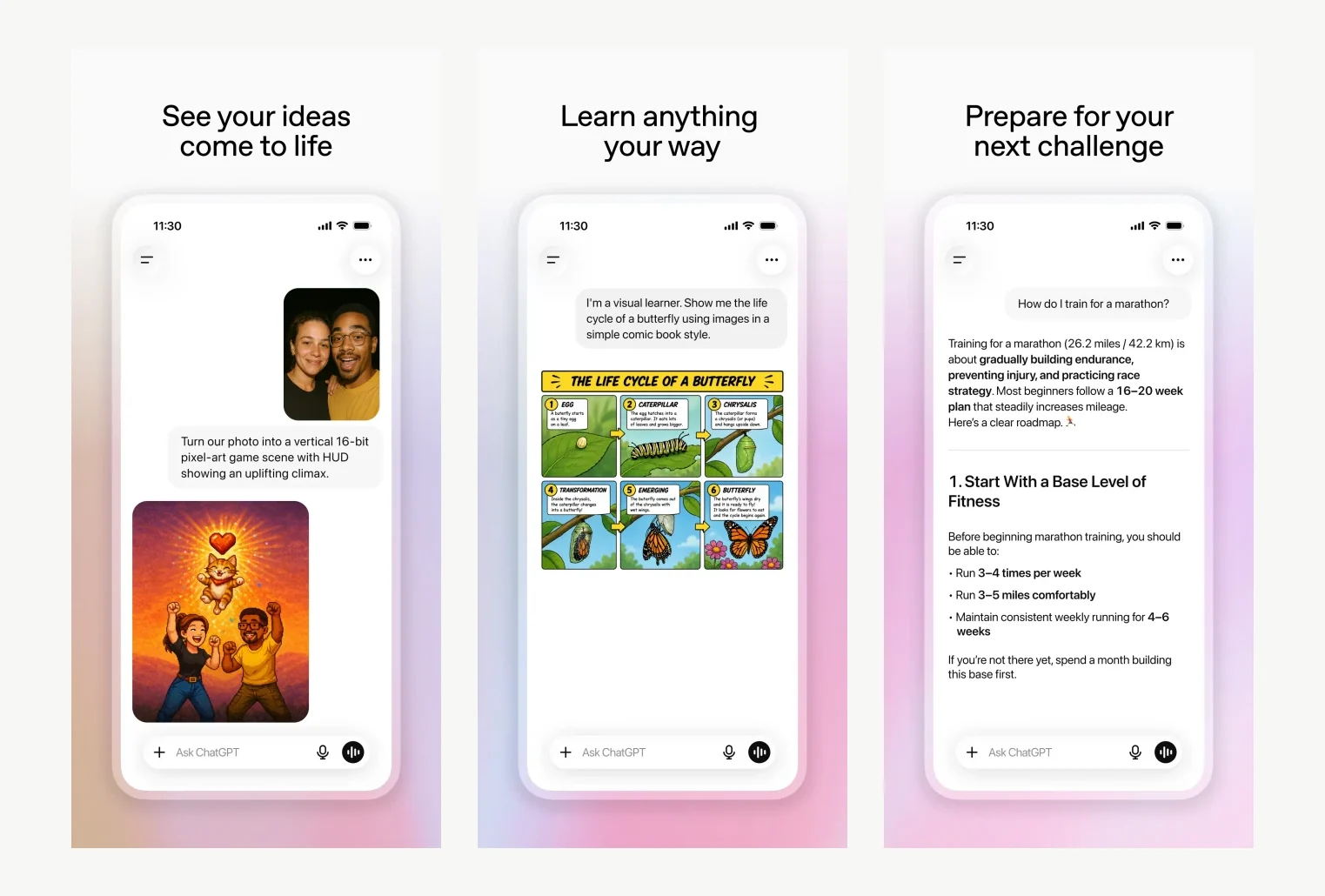
ChatGPT on iPhone, showing three common ways to move from a prompt to a useful visual or structured result.
Interface reference · Official ChatGPT App Store listing ↗ · Captured August 2, 2026ChatGPT is a general AI assistant. Broad everyday work: drafting, file analysis, research, image work, voice, and structured problem-solving. This guide covers the whole path in one place: official access, a first session that produces something reviewable, the checks that make output trustworthy, and the permissions worth limiting before you connect real work.
AI should make the work easier to inspect. If the workflow removes the source, the owner, or the review step, redesign the workflow.
Access & setup
Find, install, and sign in to ChatGPT
Get into the official ChatGPT experience with the right account and a setup you understand.
- 01
Start at https://chatgpt.com/ and confirm the domain before entering account or payment information.
- 02
Availability: Windows and macOS.
- 03
OpenAI documents macOS 14 or later for the current Mac app. The download page selects the installer for Apple Silicon or Intel; Windows requirements and feature availability vary by release and plan.
- 04
Sign in with the account you intend to keep using, then review plan, data, notification, and permission settings.
- 05
Run one low-risk test task before connecting sensitive files, repositories, or workspace data.
- Use official download pages.
- Review permissions during setup.
- Keep installers and applications updated.
First session
Your first useful ChatGPT session
Learn the interaction loop using a small task with a clear outcome.
- 01
Open a new chat and state the outcome, audience, source material, and constraints.
- 02
Ask for a short plan before requesting the full deliverable.
- 03
Attach the actual file or source material instead of summarising it from memory.
- 04
Check factual claims and use the final response as a draft to review, not an authority.
- State the outcome before the background.
- Provide the real source material.
- Review the result before expanding the task.
Quality control
Check the quality of ChatGPT output
Turn a plausible draft into work you are willing to stand behind.
- 01
Restate the original outcome and acceptance criteria before reviewing the response.
- 02
Mark every factual claim, calculation, quotation, or figure that could materially affect the result.
- 03
Check those items against the original source, a primary reference, or direct inspection.
- 04
Ask the tool to list its assumptions and uncertainty, but never rely on self-review as the only check.
- 05
Complete a human edit for relevance, tone, privacy, accessibility, and the exact delivery format.
- Verify consequential claims independently.
- Fluency is not accuracy; confident phrasing is not evidence.
- Keep a record of sources and review decisions.
Privacy & permissions
Use ChatGPT safely
Use the platform productively without giving it unnecessary access or authority.
- 01
Classify the task and its data before uploading or connecting anything.
- 02
Review the product, account, organisation, retention, and training settings that apply to you.
- 03
Grant the narrowest file, workspace, microphone, screen, or integration permissions needed.
- 04
Remove secrets and personal or regulated information unless your approved policy explicitly permits it.
- 05
Review the output and revoke permissions or disconnect sources that are no longer needed.
- Model and tool availability change by plan and region. A fluent answer can still be wrong, so verify consequential claims against primary sources.
- Follow your organisation's approved-use policy.
- Never treat fluent output as authorization to act.
Models & pricing
What ChatGPT costs, model by model.
OpenAI's current frontier family is GPT-5.6, released 9 July 2026 in three tiers — Sol, Terra, and Luna — which differ in capability, latency, and price rather than being separate model families.
| Model | Role | Input | Output | Long-context in/out |
|---|---|---|---|---|
| GPT-5.6 Sol | Flagship — hardest reasoning, coding, science | $5.00 | $30.00 | $10.00 / $45.00 |
| GPT-5.6 Terra | Balanced default for production workloads | $2.00 | $12.00 | $4.00 / $18.00 |
| GPT-5.6 Luna | High-volume, latency-sensitive, low cost | $0.20 | $1.20 | $0.40 / $1.80 |
| GPT-5.5 | Previous flagship | $5.00 | $30.00 | — |
| GPT-5.4 | Previous balanced tier | $2.50 | $15.00 | — |
| o3 | Reasoning model (post price cut) | $2.00 | $8.00 | — |
| GPT-4o | Legacy multimodal | $2.50 | $10.00 | — |
| GPT-4o mini | Legacy low-cost | $0.15 | $0.60 | — |
| Plan | Model access | Best for |
|---|---|---|
| Free | Luna, limited Terra | Occasional questions and drafting |
| Plus | Terra, limited Sol | Individual daily professional use |
| Pro | Sol, including extended reasoning | Heavy research, coding, and analysis |
| Business / Enterprise | Sol and Terra with admin controls | Teams needing data controls and SSO |
Figures verified 2 September 2026 against OpenAI API pricing ↗. Model pricing changes frequently — confirm before you budget.
| Provider | Frontier tier | Balanced default | Low-cost tier |
|---|---|---|---|
| OpenAI | GPT-5.6 Sol — $5 / $30 | GPT-5.6 Terra — $2 / $12 | GPT-5.6 Luna — $0.20 / $1.20 |
| Anthropic | Fable 5.1 — $10 / $50 | Sonnet 5 — $2 / $10 | Haiku 4.5 — $1 / $5 |
| Gemini 3.1 Pro — $2 / $12 | Gemini 3.1 Pro — $2 / $12 | Gemini 3.5 Flash-Lite — $0.15 / $1.25 |
Cross-provider comparison verified 2 September 2026. Sources: OpenAI API pricing ↗ · Claude platform pricing ↗ · Gemini API pricing ↗
Common questions
ChatGPT questions people actually ask.
What is the difference between GPT-5.6 Sol, Terra, and Luna?
They are three tiers of the same GPT-5.6 family, separated by capability and cost rather than by purpose. Sol is the flagship for the hardest reasoning, coding, and research work at $5 per million input tokens. Terra is the balanced default for production applications at $2. Luna is optimised for speed and volume at $0.20, for simple high-frequency tasks where cost per request dominates.
Which GPT-5.6 tier should I actually use?
Start on Terra. It is the intended default and handles most production work. Move to Sol only when you can demonstrate Terra failing a task you can measure, and move to Luna when the task is simple, repetitive, and high-volume. Choosing Sol by default is the most common way teams overspend on the OpenAI API.
How much does the OpenAI API cost per million tokens?
As of September 2026, from $0.20 per million input tokens on GPT-5.6 Luna to $5 on GPT-5.6 Sol, with output tokens billed at roughly six times the input rate. Cached input bills at 10% of standard, and the Batch API halves both directions.
How do I reduce OpenAI API costs without changing model?
Three levers, in order of impact: use the Batch API for anything not needed in real time to halve the bill; structure prompts so the stable portion is cached, billing at 10% of standard input; and cut output tokens, which cost about six times what input costs, by requesting tighter formats.
Is ChatGPT Pro worth it over Plus?
Only if you are regularly hitting the limits of the Terra tier on hard reasoning or long coding tasks. Pro's value is access to Sol and extended reasoning. If your work is drafting, summarising, and everyday questions, Plus reaches the same quality for a fraction of the cost.
Does ChatGPT train on my conversations?
It depends on the plan and your settings. Business and Enterprise plans do not train on your data by default; consumer plans have a data-controls setting that governs it. Verify the setting on the account you actually use before uploading client material, and never rely on a plan's marketing page as evidence.
Core workflows
Step-by-step ways to use ChatGPT for the work it does best.
Each workflow below has its own outcome, steps and review checkpoints.
Turn PDFs, spreadsheets, notes, and images into a reviewable analysis without losing sight of the source.
↓ 02 WorkflowUse ChatGPT for source-backed researchBuild a research brief that distinguishes evidence, inference, and open questions.
↓Workflow 01
Analyze documents and files with ChatGPT
Turn PDFs, spreadsheets, notes, and images into a reviewable analysis without losing sight of the source.
Outcome: Move from a raw file to a useful, checked deliverable.
- 01
Upload the original file and explain what it is, who produced it, and what decision you need to make.
- 02
Ask ChatGPT to describe the file structure and any obvious gaps before it analyzes the content.
- 03
Request findings in a table with a source location, confidence level, and unanswered question for every important claim.
- 04
Open the cited pages, rows, or passages yourself and correct any mismatch before using the result.
- 05
Ask for the final output in the exact format you need: memo, checklist, email, or action plan.
ChatGPT on iPhone, showing three common ways to move from a prompt to a useful visual or structured result.
Interface reference · Official ChatGPT App Store listing ↗ · Captured August 2, 2026What good use looks like
- Keep the original file attached for follow-up questions.
- Separate extraction from interpretation.
- Use a fresh chat when the task changes materially.
Workflow 02
Use ChatGPT for source-backed research
Build a research brief that distinguishes evidence, inference, and open questions.
Outcome: Get a decision-ready brief rather than a confident-looking answer.
- 01
Define the question, geography, date range, audience, and decision the research will support.
- 02
Ask for a research plan and the types of primary sources it will prioritize.
- 03
Require a source beside every material factual claim and ask for publication dates.
- 04
Open the decisive sources and compare their wording with the summary.
- 05
Finish with assumptions, conflicting evidence, missing information, and a recommended next check.
What good use looks like
- Prefer primary sources over roundups.
- Treat citations as leads to inspect.
- Record the date the research was completed.
Official references
Check the current product documentation.
Features, plan limits, availability, and data controls change. These official pages are the starting points used for this guide.