How to use SolCard Inference
SolCard Inference is a prepaid chat app and API for open models with refusal training removed, paid in crypto or from a SolCard card balance. It costs several times more than the same base models elsewhere, and you can't independently check its "keeps nothing" claim. It's a narrow tool, so decide whether that trade suits your work.
The short version
- Sign up with an email or a Solana wallet. Create a key that starts with
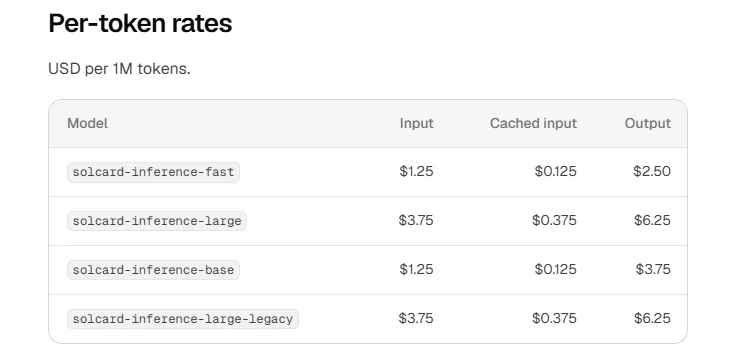
sk-si-, then point an OpenAI SDK athttps://api.solcardinference.ai/v1. - Fast is $1.25 input, $0.125 cached and $2.50 output per million tokens. DeepSeek lists the base model at $0.15 to $0.30, $0.003 to $0.006 and $0.60 to $1.20.
- "No logs" is SolCard's claim, not an audited fact. It has no published usage policy that could be found, and it doesn't name its model host or location. It isn't anonymous either.
- The one-sentence install for Claude Code or Codex adds a background proxy and edits your settings. Skip it and use the base URL if you don't need both side by side.
Disclosure: Troiana chose to feature SolCard Inference. SolCard doesn't pay us for this guide.
At a glance
- What it is
- Chat app and API for modified open models
- Models
- Fast, Large, Base, plus Large legacy
- Input types
- Text only on the API
- Paying
- Crypto or SolCard card balance, or a plan
- Plans
- $20, $100, $200 a month
- Company
- SC Payments Limited, Hong Kong
Official links
Is SolCard Inference right for me?
Good fit if
- Your legitimate work, such as defensive security research, gets refused by mainstream assistants
- You want every request on one zero-retention promise without choosing a model label, and you accept that it's a promise
- You pay in crypto and prefer a prepaid balance that SolCard says never expires
- You want a plan that also backs your API keys, which Venice's plans don't, per SolCard's comparison
Look elsewhere if
- Cost matters most, because the same base models cost far less elsewhere
- You need a published audit, a named host or a signed data agreement before sending work
- You need images, audio or files on the API, or a model above 32,768 output tokens per request
- You need true anonymity, as SolCard keeps your email or wallet, per-request billing lines and IP logs
How do I make my first request?
Create an account, add credit, create a key and send one request. New accounts get $1 of free credit, per the install runbook.
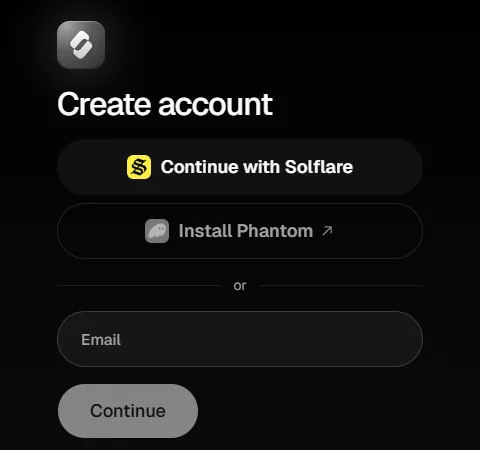
- Sign up at
app.solcardinference.ai. Try the chat app with a real question before you add money. - Open API keys and create one. Keys start with
sk-si-and are shown once, so store yours in a secrets manager. - Give the key a monthly spend limit if you'll share it or use it in an agent. A key at its limit returns
402 key_limit_exceeded. - Open Top up to add credit, or Plans to choose a plan. Check the network and token on the page before you send funds, because a crypto payment is hard to reverse.
- Send a request and log
usagefrom the reply, so you can see how much was cached.
From the quickstart, with max_tokens added to limit the hold on your balance
export SOLCARD_INFERENCE_KEY="sk-si-..."

curl https://api.solcardinference.ai/v1/chat/completions \
  -H "Authorization: Bearer $SOLCARD_INFERENCE_KEY" \
  -H "Content-Type: application/json" \
  -d '{
    "model": "solcard-inference-fast",
    "max_tokens": 1000,
    "messages": [{ "role": "user", "content": "Say hello in five words." }]
  }'
The base URL differs between the two SDKs, which is the common first mistake
# OpenAI SDK: base URL includes /v1
from openai import OpenAI
client = OpenAI(base_url="https://api.solcardinference.ai/v1", api_key="sk-si-...")

# Anthropic SDK: base URL has no /v1, and max_tokens is required
from anthropic import Anthropic
client = Anthropic(base_url="https://api.solcardinference.ai", api_key="sk-si-...")
Older IDs still work. flash, large-v2, base and large map onto the new names, and replies report the new ID. SolCard's own docs introduction still uses flash. Note that the old large now means the legacy model, so use the full solcard-inference-large.
Is SolCard Inference expensive?
Yes, against the same base models elsewhere. You're paying for SolCard's modified models and its privacy claims, not for lower token prices. The largest gap is on cached input.
| Where | Input | Cached input | Output | Note |
|---|---|---|---|---|
| SolCard Fast | $1.25 | $0.125 | $2.50 | Modified model, built on V4.1 Flash |
| DeepSeek, off-peak | $0.15 | $0.003 | $0.60 | V4.1 Flash, half price outside peak hours |
| DeepSeek, peak | $0.30 | $0.006 | $1.20 | 01:00 to 04:00 and 06:00 to 10:00 UTC, on weekdays |
| SiliconFlow | $0.15 | $0.003 | $0.60 | V4.1 Flash |
| Venice | $0.13 to $0.18 | $0.028 to $0.038 | $0.26 to $0.37 | V4 Flash variants, marked Private. Not V4.1. |
| OpenRouter | From $0.006 | Not listed in text read | From $0.25 | Lowest rates come from different providers, and privacy varies |
| Where | Input | Cached input | Output |
|---|---|---|---|
| SolCard Large | $3.75 | $0.375 | $6.25 |
| Z.ai, through OpenRouter | $1.40 | Not listed in text read | $4.40 |
| SiliconFlow | $1.40 | $0.26 | $4.40 |
| Venice, Private | $1.75 | $0.325 | $5.50 |
A worked session, by simple arithmetic. Take 2,000,000 cached tokens, 200,000 fresh tokens and 50,000 output tokens, which is a fair shape for a coding-agent session. On Fast that costs about $0.63. On DeepSeek's own API it costs about $0.07 off-peak and $0.13 at peak. So the same session costs roughly 5 to 9 times as much. The session size is an illustration, not a vendor figure.
SolCard's own comparison is fair on some points. It says OpenRouter adds 5.5% when you buy credits and that Venice plans don't cover API use. It also concedes that some Venice uncensored models are cheaper per token. Its pages don't say how far above DeepSeek's own rates its prices sit, and that's the number you should work out first.
Plans
- Starter at $20 holds 20% more usage than pay as you go
- Pro at $100 holds 5× Starter's usage
- Max at $200 holds 10× Starter's, and is listed as 25% more
- Rates rise from 60 requests a minute to 120, 300 and 600
Plan catches
- Each 5-hour window is a twentieth of the month's usage
- On Starter that's about $1.20 of usage per window, by arithmetic
- Unused usage doesn't roll over
- "Nothing is refunded", and plans renew from your balance
Small inconsistency. Max is listed as 10× Starter's usage and as 25% more than pay as you go. Those work out to $240 and $250 of usage, so check the dashboard rather than either figure. SolCard's own estimate of a Fast coding turn is about $0.02, which would put Starter's window at around 60 turns.
Why did a request fail or cost more than I expected?
Usually because of the hold. SolCard reserves your maximum possible cost before each request, then refunds the difference, so a small balance can fail or get its reply shortened.
| Status and code | What it means | What to do |
|---|---|---|
402 insufficient_balance | Credits and plan can't cover the request | Top up. If available_micros is high, the request itself is too big. |
402 key_limit_exceeded | That key's monthly limit is short | Wait for next month, or raise the limit |
429 plan_limit_reached | Your 5-hour or weekly window is spent | Wait for resets_at, or top up |
429 rate_limited | Too many requests a minute | Wait for retry-after |
429 concurrency_limited | Too many in flight | Retry after a second, or reduce parallel work |
504 upstream_timeout | The generation passed 9 minutes | Charged, so don't retry blindly. Split the job. |
403 content_policy_violation | Outside the usage policy | Don't retry. See the next section. |
Hidden costs
- Reasoning tokens bill as output, and Large always reasons
- Web search adds $0.008 a search, on Chat Completions only
- Leaving out
max_tokensholds room for 32,768 output tokens - Several requests at once can tie up more than they'll spend
Not supported on the API
- Image, audio or file input, which return
400 unsupported_content nabove 1,best_of,previous_response_idandstore: true- Hosted tools other than functions on Chat Completions
- Output above 32,768 tokens per request
Streams can end without a bill breakdown. If an error occurs after a stream starts, it ends with no final usage event, so your own cost log may have gaps. Reconcile against the usage page. That reconciliation step is general advice.
Does it really never refuse?
Not quite. The homepage says "Answers everything", but the API documents a policy error, and SolCard says every message passes an automated content check at its model host.
| Where | Statement |
|---|---|
| Homepage | "Answers everything. Keeps nothing." |
| OpenRouter comparison | Models are open-weight "with their refusal training removed" |
| Errors docs | 403 content_policy_violation: "The request is outside the usage policy" |
| Keeps nothing post | "Every message also passes the host's content check: an automated classifier that records its decision" |
No usage policy could be found. Searches of the docs sitemap and likely addresses found no published policy, even though an API error cites one. So you can't tell in advance what triggers a 403 or whether repeats risk an account suspension, which is its own error, 403 account_suspended. Ask support before depending on it.
What it's sold for. SolCard's examples are reproducing a disclosed CVE in a sandboxed lab, writing detections for a malware sample, and generating adversarial test data for a safety classifier. A model that doesn't refuse also won't warn you when you're wrong, so review output as carefully as you'd review a contractor's work. The law and your own contracts still apply. That's general advice, not a SolCard statement.
The quality question. SolCard shows an Artificial Analysis Intelligence Index score of 32 for both Large and Fast on its homepage, and links out for each. Those scores appear to relate to the base models. Removing refusal training is a modification, and the pages read for this guide don't show benchmarks of the modified models. Test your own task. SolCard doesn't publish what Base is built on.
Is SolCard Inference private?
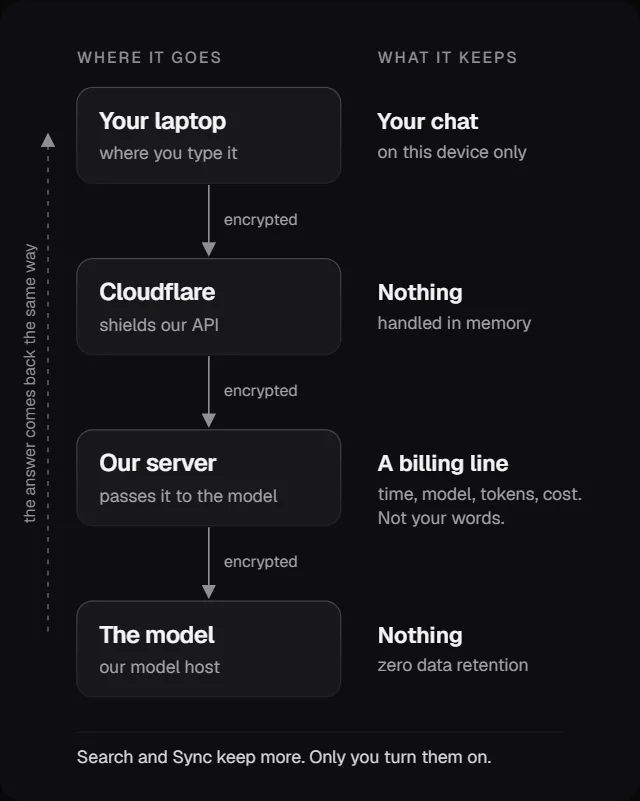
It makes specific zero-retention claims and describes them in detail, which is more than many do. But they're unverified vendor statements, in a blog post rather than a signed document, and it isn't anonymous.
| Item | Why | How long |
|---|---|---|
| Email or wallet address | Your account | As long as the account exists |
| A line per request: time, key, model, tokens, cost, speed, outcome | Billing | Kept |
| Your IP address, in a server access log | Security | Until the log rolls over |
| Pages you load, in a web host log | Running the site | 1 day |
| Rate-limit counters | Fair use | Minutes to a day |
| Sync data, if you enable Sync | Your chats, end-to-end encrypted | Backups expire within 7 days after deletion |
What you can't verify from outside
- Whether prompts stay out of logs on its servers
- The name and location of its model host
- Whether the host keeps to zero retention
- What the backup route's providers do in practice
- Any audit or attestation, as none was found
What you can check
- In the chat app, the browser's Network tab, per SolCard's own instructions
- The content-security-policy header in the app
- That Search is off until you enable it
- Your own usage page, for what billing records
Don't call this anonymous. You sign in with an email or wallet, SolCard's server logs your IP address, and Cloudflare sees it too. A wallet's payments are public on its blockchain, so a top-up can usually be linked to the sending wallet. That's general reasoning about public blockchains. Paying from a SolCard card can involve identity checks, since its privacy policy describes KYC "depending on your card type", naming Platinum.
The legal pages don't appear to cover this product. solcardinference.ai/terms opens the "SolCard Card Agreement", about prepaid cards, and /privacy is a policy last updated on 26 January 2025 that focuses on card customers. The "Data handling" link leads to a blog post. So no contract promising zero retention could be found. SolCard's card terms also bar people in Hong Kong and sanctioned territories from "any SolCard service", and they allow forfeiting a balance over location misrepresentation. Read them yourself.
Treat the "Check it yourself" section with care. SolCard says it ran a test message through and found zero matches, and it describes checks of the live code. Those are its own tests. Its Network tab advice only shows where your browser sends data, not what happens after it arrives.
What does the Claude Code or Codex install change?
It runs a local proxy all the time, and your own Claude or ChatGPT login passes through it. That's more than the one-sentence prompt suggests, so read the runbook first.
- Claude Code or CodexNow points at
127.0.0.1 - Local proxyCLIProxyAPI, as a login service
- SolCard modelsSent to SolCard with your
sk-si-key - Your own modelsSent to Anthropic or OpenAI with your login
| Change | Claude Code | Codex |
|---|---|---|
| Proxy | Upstream CLIProxyAPI 8.0.46 | SolCard's fork, 8.0.46-solcard.2, from SolCardDev |
| Folder | ~/.solcard-inference | ~/.solcard-inference/codex |
| Runs at login | systemd user service or macOS LaunchAgent | Its own systemd service or LaunchAgent |
| Shell | Adds a line to .bashrc or .zshrc for ANTHROPIC_BASE_URL and a local key | Set through config.toml |
| Settings | Four modelPicker rows and a SessionStart hook in ~/.claude/settings.json | model_provider and a provider table in ~/.codex/config.toml, plus removal notes as comments |
| Side effects | Remote Control is off while it's set up | Needs codex app-server daemon restart |
Read these pages as text. Don't pipe them to a shell. The prompt "Add SolCard Inference to my models: solcardinference.ai/install" tells your agent to fetch instructions from a web page and carry them out, with your files and shell. That page can change at any time. Read the runbook yourself first: curl -fsSL https://api.solcardinference.ai/install/claude-code. Then decide. SolCard's docs do say it's written for an agent and isn't a script.
What Anthropic's page says
- It "doesn't endorse, maintain, or audit third-party gateway products"
- It doesn't support routing Claude Code to non-Claude models through any gateway
- Setting only
ANTHROPIC_BASE_URLdoesn't replace a subscription login, and its limits still apply - So the runbook's description of those points matches the docs
What to weigh
- Your Claude or ChatGPT login passes through this proxy on every request
- Support for this setup comes from SolCard, not from Anthropic or OpenAI
- Codex uses a build from SolCard's own fork, so you're trusting it too
- The Claude desktop app's Code tab and Cowork won't show these models
- Your subscription's terms are yours to check. This guide doesn't advise on them.
- To undo it, ask the agent to "remove SolCard Inference from my models".
- Check that the
solcard-inferencerows and the hook are gone from your settings file. - Check that the line is gone from your shell profile, and the service is stopped.
- Delete the key at
app.solcardinference.ai/keys, since the runbook says it still exists afterward.
Docs versus runbook. SolCard's coding-agents page matched the current runbooks on the main points when checked, including the browser approval. The homepage still says the agent "asks for your key", while the runbook says you approve in the browser and only use a pasted key if your message includes one. Follow the runbook, and don't paste a key into an agent chat if you can avoid it.
Which model should I pick?
Start on Fast, and move to Large only for planning or hard debugging. Large costs about three times as much and always reasons, which adds output tokens.
| Model ID | Built on | Context | Good for |
|---|---|---|---|
solcard-inference-fast | DeepSeek V4.1 Flash | 1,048,576 | Default. File reads, small edits, tests. |
solcard-inference-large | GLM-5.3 | 1,000,000 | Planning and hard bugs. Always reasons. |
solcard-inference-base | Not published | 262,144 | General use. Output costs more than Fast. |
solcard-inference-large-legacy | GLM-5.2 | 1,000,000 | The older Large. SolCard says to use Large instead. |
One odd choice. Base has the same input price as Fast and a higher output price, with a smaller context, and SolCard doesn't say what it's built on. Without a clear reason, there's little case for it. That's a judgment from the published table, not a SolCard statement.
Try before you pay for an agent. Paste the prompt that another assistant refused into the chat app on the free credit, on Fast then on Large. If it doesn't help, you've saved yourself the setup. If you're only after a lower bill, look at the DeepSeek guide or OpenRouter guide instead.
| You mainly want | Start with |
|---|---|
| The lowest token price on these model families | DeepSeek's own API or SiliconFlow |
| Hundreds of models behind one key, including closed ones | OpenRouter |
| Images, video and audio as well as uncensored text | Venice |
| Modified models with one zero-retention promise, paid in crypto | SolCard Inference |
| Prompts that never leave your machine | A local runner such as Ollama |
If privacy is the real goal, a model running on your own hardware needs no one's promise. It's the only option here where you can verify where your prompts go, at the cost of hardware and setup.
Hidden tips
Details that are easy to miss, each with the official page that backs it up.
-
Set max_tokens on a small balance
Without it, each request holds room for 32,768 output tokens. SolCard's billing post warns that a few at once can tie up more balance than they'll ever spend.
How billing works -
Don't auto-retry a 504
A 9-minute
Errorsupstream_timeoutwas charged. SolCard setsx-should-retry: falseon it so SDKs won't repeat it. Check that your own retry code respects this. -
Read required_micros on a 402
When
Errorsavailable_microsis well above zero, the request is too large for what's left, so shorten the conversation before adding money. -
Search leaves the zero-retention path
SolCard says search queries go to a search engine with its own rules, so "zero data retention doesn't cover web search". Leave it off for sensitive work.
Keeps nothing -
Chat history lives in one browser
Chats sit in your browser's own database unless you enable Sync. Clearing browser data could remove them, so export what matters. That risk is an inference from where they're stored.
Keeps nothing -
Limits apply per account
Rate limits cover all your keys together, at 60 requests a minute and 5 at once on pay as you go. Agents can hit concurrency first, so lower parallel tasks.
Rate limits -
Referral credit has strings
Referrals pay 10% of what people spend for 365 days, as usage credit. It expires after 90 days and can't be withdrawn, so don't count it as income.
SolCard Inference homepage -
Check the live price with your key
PricingGET /v1/modelsreturns each model's current rates. Use it instead of any guide, including this one, because prices may change.
SolCard Inference FAQ
How much does SolCard Inference cost?
Pay as you go is $1.25 input, $0.125 cached and $2.50 output per million tokens on Fast, and $3.75, $0.375 and $6.25 on Large. Web search adds $0.008 a search. Plans are $20, $100 and $200 a month, all checked on 5 November 2026.
Is SolCard Inference cheaper than DeepSeek or OpenRouter?
No. DeepSeek lists V4.1 Flash at $0.15 to $0.30 input, $0.003 to $0.006 cached and $0.60 to $1.20 output. Fast costs several times that, and far more on cached input. You'd be paying for its modified models and privacy claims, not the token price.
Is SolCard Inference anonymous?
No. It doesn't require identity documents to sign up with an email or wallet, but it keeps that email or wallet address, a billing line per request and IP addresses in a server log. Crypto payments can often be traced to the sending wallet.
Does SolCard Inference keep logs?
SolCard says it never keeps your messages or answers, and that it keeps a billing line, an account identifier and IP logs. That's its own description. No audit, signed data agreement or model host name could be found on 5 November 2026.
Will it answer anything I ask?
Its marketing says so, but its API documents a 403 content_policy_violation for requests outside a usage policy that couldn't be found, and SolCard says every message passes an automated content check at its host.
Is the Claude Code install safe?
It's a choice to weigh. It adds a local proxy that your Claude login passes through, a login service, a shell line and settings edits. Anthropic doesn't endorse or audit third-party gateways. Read the runbook first, or use a base URL elsewhere.
Can I send images or files to the API?
No. The API accepts text only, and non-text content returns 400 unsupported_content. The chat app says it reads attached files on your device and sends them as text.
Sources
Facts checked 5 November 2026. Products change, so confirm anything important on the official pages.
- SolCard Inference docs: Quickstart
- SolCard Inference docs: Pricing
- SolCard Inference docs: Models
- SolCard Inference docs: Rate limits
- SolCard Inference docs: Errors
- SolCard Inference docs: Claude Code and Codex
- Claude Code runbook, read as text
- Codex runbook, read as text
- SolCard Inference homepage
- Keeps nothing: follow one message
- How billing works
- SolCard vs OpenRouter, by SolCard
- SolCard vs Venice, by SolCard
- Add to Claude Code and Codex
- SolCard terms of use
- SolCard privacy policy
- Anthropic: Other LLM gateways
- DeepSeek pricing
- OpenRouter: DeepSeek V4.1 Flash
- OpenRouter: GLM-5.3
- Venice pricing
- SiliconFlow pricing
- CLIProxyAPI, upstream
- CLIProxyAPI, SolCard fork