In short
To move off Replit, connect the project to GitHub or download a ZIP, then recreate your environment on a new host. Secrets, database contents, storage buckets, connectors and custom domains do not move with the code, so export and rebuild each one. Dump Postgres with pg_dump using a matching client version, deploy to staging, test everything, and switch your domain last.
Start with an inventory
Before you move anything, list what your app uses. Replit's own docs on copying a project say these don't carry over with the code, and the same applies to leaving the platform:
| Item | What to do |
|---|---|
| Secrets | Copy names, and recreate values on the new host; rotate where you can |
| Database data | Export with pg_dump, and restore with pg_restore |
| App Storage buckets | Download objects and upload them to new storage |
| Connectors | Reconnect each integration with your own accounts |
| Deployments | Set up on the new host |
| Custom domain | Remove from the old deployment; connect to the new one |
| Agent history | Stays behind, so note anything you need |
Step 1: get the code out
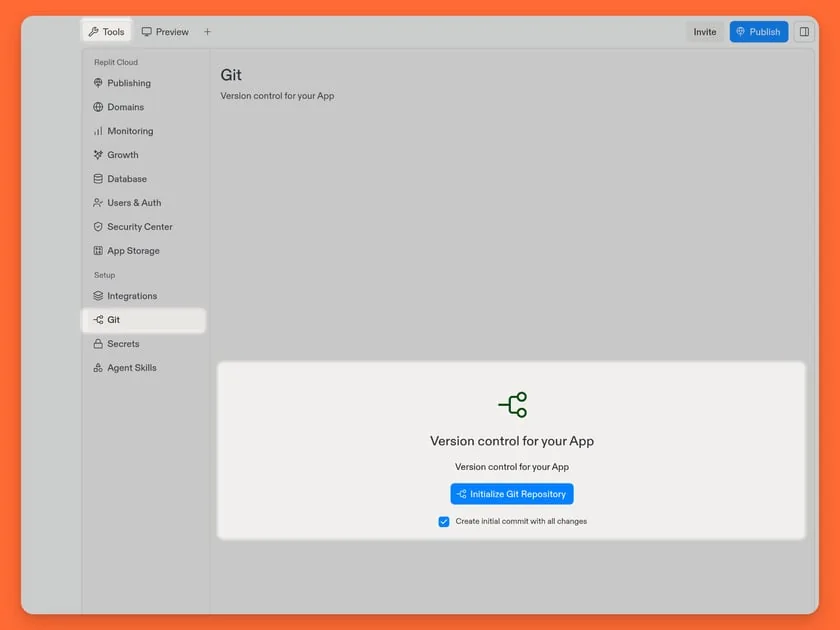
GitHub is the better route. In your account's connected services, link GitHub. Then open the Git pane in your project and connect a repository. Replit's docs note that GitHub carries your history, and auto-sync can keep both sides up to date during the move. Only committed and pushed files are carried over, so check that nothing important is left out. Ignored files, such as local data, won't be there.
ZIP as a backup. Use the three-dot menu on the file tree and choose Download as zip. If you need a smaller file, exclude rebuildable folders such as node_modules and .venv. A workspace admin can ban source code export on some plans, so check that first if you're on a team.
Immediately search the repository for hard-coded secrets, and rotate anything you find. See how to find exposed API keys.
Step 2: remove Replit-specific assumptions
Replit defines how your app runs in files such as .replit and replit.nix. These won't mean anything on your new host, so use them as documentation. They'll tell you:
- The run and build commands
- Language versions
- System packages your app needs
Then make these explicit in your project. Add a package.json engines field or a similar version file, and consider a Dockerfile, as a container makes the environment portable. Next, search your code for Replit-specific modules, such as the object storage client and any Replit-managed database or auth helper, and plan replacements for them.
Also check your code binds to the port your new host expects. Many platforms supply a PORT environment variable.
Step 3: confirm which database you have
Replit offers different storage options, and a third-party guide warns that its built-in key-value “Replit Database” isn't PostgreSQL. So find out what you're using.
For Postgres, export it with pg_dump:
pg_dump "$DATABASE_URL" -Fc -f backup.dump

pg_restore --no-owner --dbname "$NEW_DATABASE_URL" backup.dump
A user on the Replit forum reported a version mismatch between the hosted server and the workspace client, which is a common problem. Your pg_dump version must be at least as new as the server, so check with SELECT version(); first and install a matching client if needed.
For a key-value store, you'll need a small script that reads each key and writes it to your new database. Take this opportunity to design a proper schema.
Then verify that the row counts match, and test a restore before you rely on it.
Step 4: move files
If you use App Storage, download your objects and upload them to a service such as S3, R2 or Supabase Storage. Then update your code, and any URLs stored in the database. Search your data for old file URLs, as those are easy to forget.
Step 5: choose a host and deploy to staging
Your choice depends on what your app needs:
- Always-on server, workers or WebSockets: Railway, Render or a VPS.
- Next.js or front-end heavy: Vercel or Netlify.
- Static front end plus a separate API: split them only if you need to.
Set your environment variables, deploy, and connect to a copy of your database. Then test every journey that matters: sign-in, payments, email, uploads, cron jobs and webhooks. Auth providers will need your new domain added to their allowed list of redirect URLs. See web app testing before launch.
Scheduled tasks are easy to overlook, so list everything that ran automatically on Replit, and recreate it on the new host.
Step 6: cut over
- Lower your DNS TTL a day or two in advance.
- Choose a quiet time and announce any downtime.
- Stop writes on the old app, using a maintenance mode if you have one.
- Run a final database and file sync.
- Update webhooks at Stripe and others, so that they point to the new address.
- Point your domain to the new host. How DNS works explains the timing.
- Watch your logs and errors closely for a few days.
Keep the old deployment available, but with writes disabled, until you're sure. Then cancel your Replit plan and rotate any remaining secrets.
If you have search traffic, keep your URLs the same, or follow a migration checklist.
Before you go: is moving the right fix?
Check why you're leaving. If it's cost, then Replit's budget limits and moving heavy Agent work elsewhere might be enough. You can keep your code in Replit while using other tools. If it's reliability or compliance, then moving makes sense. See how to fix a vibe-coded app if the real problem is your code rather than your host, since that problem will move with you.
If you want help planning the move, book a call.
Common questions
Can I export my code from Replit?
Yes. You can connect the project to a GitHub repository, with two-way sync, or download it as a ZIP from the file tree menu. GitHub is usually better, since it preserves your commit history. Team admins can restrict exports on some plans.
How do I export my Replit database?
For Postgres, use pg_dump with your database connection string, and restore it with pg_restore on the new host. Match client and server versions to avoid errors. If you use Replit's key-value database, you'll need a script to copy the data.
Do secrets transfer when leaving Replit?
No. Replit says secret values stay in the old project, so you must add them again on your new host. It's a good opportunity to rotate them. Make a list of all secret names before you begin, so you don't miss any.
Where should I host an app after Replit?
It depends on your app. Railway or Render suit always-on servers, workers and databases, while Vercel or Netlify suit front-end heavy apps. If you need full control, a VPS works too, although you'll then take on more operational responsibility.
